 Firefox
 1 / 5
1 / 5About Veggie Doodle Font
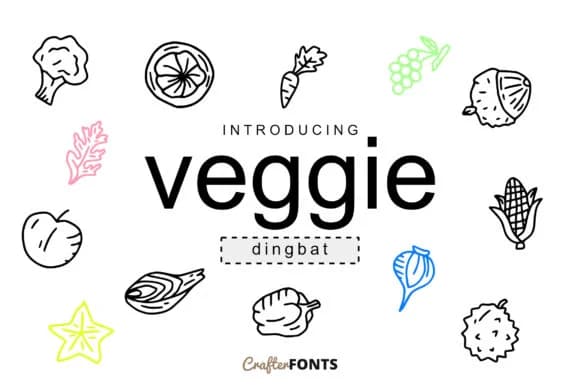
This font brings a lighthearted, hand-drawn charm that works beautifully for gardening and food-focused projects. Veggie Doodle, designed by CrafterFonts, is a playful dingbat collection where vegetables become actual design elements rather than just decorative afterthoughts.
The 62 individual symbols inside give you everything from carrots and tomatoes to leafy greens, potatoes, and peppers, each rendered with a casual sketch quality that feels authentically hand-drawn. These glyphs work beautifully in farmers market labels and signage, organic product packaging for small food brands, recipe card illustrations for lifestyle blogs, and farm-to-table restaurant menus that tell a story. They function equally well as standalone graphic elements or layered in patterns and compositions. The informal line weight and approachable style keep designs from feeling corporate or over-polished, which is exactly what food and garden brands are actually looking for.
Combine Veggie Doodle with a clean, readable sans-serif for any body copy, letting the doodles anchor the visual weight and guide attention where it matters. This pairing approach keeps everything balanced and lets each typeface do what it does best without competing. Grab Veggie Doodle on Creative Fabrica to bring genuine personality to your next food or gardening project.
Style & Use Cases
- Overall Style
- Iconographic, Doodle
- Use Case
- Icons, Accents
- Ideal For
- ornaments, bullets, and decorative flourishes
- Pairs With
- any text font
How to Install Veggie Doodle Font
Step-by-step instructions for every platform
- 1Download the Veggie Doodle font file (.ttf or .otf).
- 2Locate the downloaded file in your Downloads folder.
- 3Right-click the font file.
- 4Select "Install" to install for the current user, or "Install for all users" to make it available system-wide.
- 5Veggie Doodle is now available in Word, Photoshop, Illustrator, and all other apps.
More by CrafterFonts
View all →
Browse fonts by theme
Curated collections →Saw a font in a picture? Identify any font from an image with our free Font Finder.
More Dingbats Fonts
Browse all →







What pairs well with Veggie Doodle Font?
Veggie Doodle Font is a versatile dingbats font that works for both headings and body text. Pair it with a contrasting sans-serif or serif font to add visual interest and a clear distinction between titles and body copy.



Veggie Doodle Font
by CrafterFonts
Reviewed by the FontBoxDL team · Updated July 2026