 Firefox
 1 / 3
1 / 3Loading font…
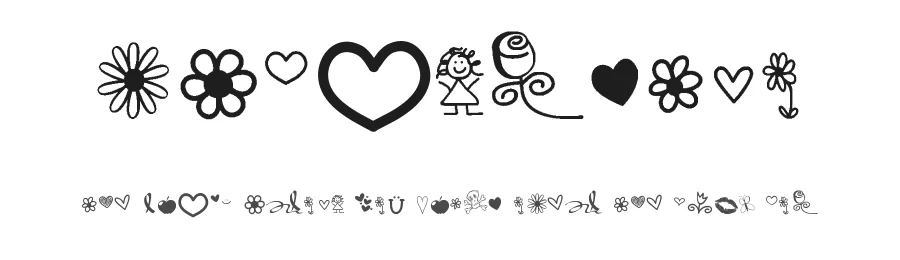
About VBdingsTwo Font
VBdingsTwo is a display dingbat font in medium weight, created to deliver 56 distinctive symbolic glyphs for creative projects spanning everything from handmade crafts to polished digital design. Its comprehensive support for 89+ Latin-based languages makes it accessible to designers and crafters working across international markets and different writing systems, broadening its appeal well beyond English-speaking audiences.
The ornamental character set serves naturally in decorative contexts throughout both print and digital mediums. Scrapbookers and card makers can use these symbols to create embellished layouts, invitation suites, and gift designs infused with hand-drawn charm and personality. Web designers might deploy them as custom accent elements, dividers, or alternative icon systems for branding applications and interface design. Print professionals can incorporate the dingbats as decorative separators, bullet point variations, and border flourishes in publications and layouts. Crafters using cutting machines like Cricut can adapt these symbols into vinyl decals, stencil designs, and layered craft projects for a unique handmade quality.
The font is available free for personal use, though a commercial licence can be obtained directly from the designer for professional or business applications. Creative projects seeking symbolic embellishment and ornamental depth will find VBdingsTwo most valuable, especially as an alternative to purely functional typography.
Style & Use Cases
- Overall Style
- Eye-catching, Bold, Dingbats
- Use Case
- Headlines, Logos
- Ideal For
- posters, branding, and social media graphics
- Pairs With
- a readable sans or serif for body
VBdingsTwo Specifications
| Font Family | VBdingsTwo |
| Style | Medium |
| Full Name | VBdingsTwo |
| Version | 001.000 |
| Weight | 500 (Medium) |
| Glyph Count | 56 glyphs |
| PostScript Name | VBdingsTwo |
| Format | TTF (TrueType) |
| File Size | 91.4 KB |
Languages Supported
VBdingsTwo supports 89 languages.
How to Install VBdingsTwo Font
Step-by-step instructions for every platform
- 1Download the VBdingsTwo font file (.ttf or .otf).
- 2Locate the downloaded file in your Downloads folder.
- 3Right-click the font file.
- 4Select "Install" to install for the current user, or "Install for all users" to make it available system-wide.
- 5VBdingsTwo is now available in Word, Photoshop, Illustrator, and all other apps.
Browse fonts by theme
Curated collections →Saw a font in a picture? Identify any font from an image with our free Font Finder.
More Display Fonts
Browse all →







What pairs well with VBdingsTwo Font?
VBdingsTwo Font is a display font that shines as a display or heading face. Pair it with a clean sans-serif or serif font for body text — the contrast creates a clear hierarchy while the two styles stay balanced and easy to read.




Premium Display Fonts
★ PremiumWant something with more weights, glyphs, and commercial polish? These premium display fonts are worth a look.
VBdingsTwo Font
Reviewed by the FontBoxDL team · Updated October 2026
License: Free for personal use