 Firefox
 1 / 6
1 / 6About Various Stars Font
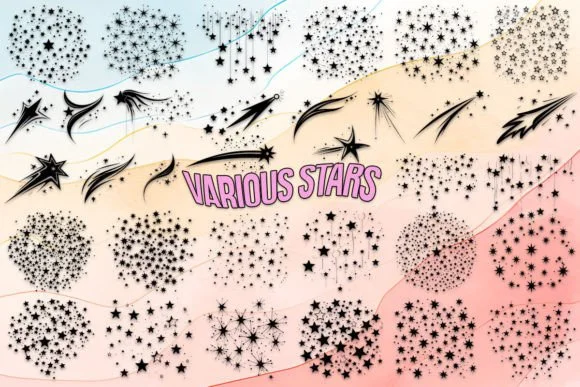
Various Stars by MOMAT THIRTYONE is a dingbats collection built entirely from star symbols and celestial shapes. The typeface includes 26 uppercase characters, 26 lowercase variations, and the complete 0-9 numeral set, giving you real flexibility in how you layer and compose them within a design. Most designers approach it as a symbol set rather than a replacement typeface, which opens up creative possibilities for layout and visual hierarchy that a traditional font simply can't match.
This works especially well for invitation suites and greeting card designs where you need a cohesive visual language running through the whole set. You'll also find it invaluable for Etsy shop branding and product packaging labels that rely on consistent celestial imagery to build brand recognition. The same thinking applies to celestial-themed scrapbooking elements and vinyl decal cutting projects, where star symbols anchor the entire composition. Rather than treat it as decorative fill, try using the characters to structure your layout and create secondary design layers that feel purposeful rather than added on. The range of available characters means you can easily swap between different star styles without compromising visual consistency.
Grab the font on Creative Fabrica and start using stars as a genuine design tool, not just ornament.
Style & Use Cases
- Overall Style
- Iconographic, Shooting Stars
- Use Case
- Icons, Accents
- Ideal For
- ornaments, bullets, and decorative flourishes
- Pairs With
- any text font
How to Install Various Stars Font
Step-by-step instructions for every platform
- 1Download the Various Stars font file (.ttf or .otf).
- 2Locate the downloaded file in your Downloads folder.
- 3Right-click the font file.
- 4Select "Install" to install for the current user, or "Install for all users" to make it available system-wide.
- 5Various Stars is now available in Word, Photoshop, Illustrator, and all other apps.
More by MOMAT THIRTYONE
View all →



Browse fonts by theme
Curated collections →Saw a font in a picture? Identify any font from an image with our free Font Finder.
More Dingbats Fonts
Browse all →







What pairs well with Various Stars Font?
Various Stars Font is a versatile dingbats font that works for both headings and body text. Pair it with a contrasting sans-serif or serif font to add visual interest and a clear distinction between titles and body copy.




Various Stars Font
Reviewed by the FontBoxDL team · Updated July 2026