 Firefox
About TYPE UNCOMMON JNL Font
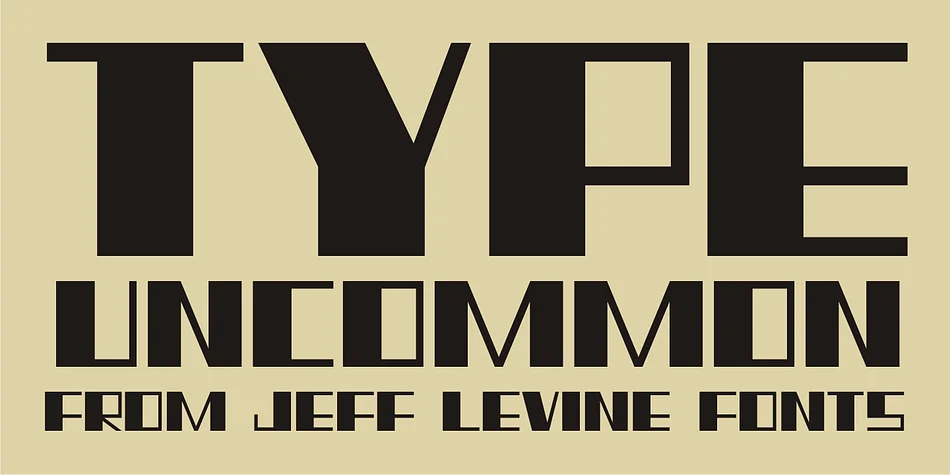
TYPE UNCOMMON JNL, designed by Jeff Levine Fonts, pulls its distinctive chunky block letterforms straight from actual 1920s sheet music, creating a font that feels genuinely rooted in that era's graphic language. The geometric, bold strokes deliver real presence without relying on ornament, which makes the font work harder for projects that demand weight and character in their typography. This kind of structural confidence is exactly what display fonts should accomplish.
Sourcing inspiration from vintage music publishing is a smart move for display work, and this one proves why. This font handles speakeasy cocktail menus, vintage record label designs, carnival signage, and retro party invitations with equal ease. Breweries use it for beer and craft beverage labels, while Etsy shops selling vintage goods find the style gives their packaging instant credibility without the pastiche. Art directors working on heritage branding projects also appreciate how the font reads instantly as period-authentic, which is harder to pull off than it looks.
The sturdy, bold forms suit any project built on early-twentieth-century sensibility. Full branding systems, packaging suites, and standalone promotional posters all benefit from typography that feels earned rather than forced. Find TYPE UNCOMMON JNL on Creative Fabrica when you need that exact period-appropriate impact for your next retro-focused project.
Style & Use Cases
- Overall Style
- Eye-catching, Bold
- Use Case
- Headlines, Logos
- Ideal For
- posters, branding, and social media graphics
- Pairs With
- a readable sans or serif for body
How to Install TYPE UNCOMMON JNL Font
Step-by-step instructions for every platform
- 1Download the TYPE UNCOMMON JNL font file (.ttf or .otf).
- 2Locate the downloaded file in your Downloads folder.
- 3Right-click the font file.
- 4Select "Install" to install for the current user, or "Install for all users" to make it available system-wide.
- 5TYPE UNCOMMON JNL is now available in Word, Photoshop, Illustrator, and all other apps.
More by Jeff Levine Fonts
View all →



Browse fonts by theme
Curated collections →Saw a font in a picture? Identify any font from an image with our free Font Finder.
More Display Fonts
Browse all →







What pairs well with TYPE UNCOMMON JNL Font?
TYPE UNCOMMON JNL Font is a display font that shines as a display or heading face. Pair it with a clean sans-serif or serif font for body text — the contrast creates a clear hierarchy while the two styles stay balanced and easy to read.




TYPE UNCOMMON JNL Font
Reviewed by the FontBoxDL team · Updated September 2026