 Firefox
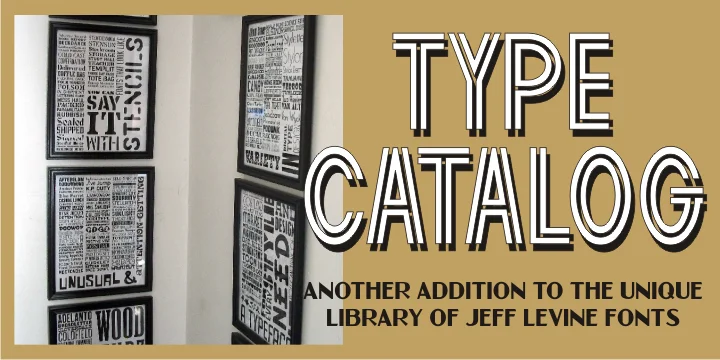
About TYPE CATALOG JNL Font
Nostalgic and distinctly mid-century, this typeface demands attention. Type Catalog JNL, designed by Jeff Levine, has an interesting backstory. Originally sketched back in 2006, the font was soon passed to fellow designer Ray Larabie for development but eventually returned to Levine, who completely redrew all the letterforms and expanded the character set into the refined, polished version you see today.
As an inline sans-serif, it delivers strong graphic impact for vintage diner menus, retro product packaging labels, classic storefront signage, throwback poster designs, and independent record packaging. The extended character set gives you real flexibility, from punchy single-word headlines to longer descriptive copy, all while still keeping that distinctive mid-century voice intact. Apothecary branding, boutique retail identities, and nostalgic restaurant menus work beautifully with this typeface. Its hand-drawn quality makes everything feel personal and carefully crafted, never feeling ordinary, generic, or flat.
Pair it with a neutral, clean sans-serif for any supporting text in mixed layouts, letting this display font shine as the focal point. The contrast creates strong visual hierarchy without the two typefaces competing for attention. You can find Type Catalog JNL on Creative Fabrica and start bringing that timeless retro aesthetic into your next design project.
Style & Use Cases
- Overall Style
- Eye-catching, Bold
- Use Case
- Headlines, Logos
- Ideal For
- posters, branding, and social media graphics
- Pairs With
- a readable sans or serif for body
How to Install TYPE CATALOG JNL Font
Step-by-step instructions for every platform
- 1Download the TYPE CATALOG JNL font file (.ttf or .otf).
- 2Locate the downloaded file in your Downloads folder.
- 3Right-click the font file.
- 4Select "Install" to install for the current user, or "Install for all users" to make it available system-wide.
- 5TYPE CATALOG JNL is now available in Word, Photoshop, Illustrator, and all other apps.
More by Jeff Levine Fonts
View all →



Browse fonts by theme
Curated collections →Saw a font in a picture? Identify any font from an image with our free Font Finder.
More Display Fonts
Browse all →







What pairs well with TYPE CATALOG JNL Font?
TYPE CATALOG JNL Font is a display font that shines as a display or heading face. Pair it with a clean sans-serif or serif font for body text — the contrast creates a clear hierarchy while the two styles stay balanced and easy to read.




TYPE CATALOG JNL Font
Reviewed by the FontBoxDL team · Updated September 2026