 Firefox
 1 / 5
1 / 5About Tools Doodle Font
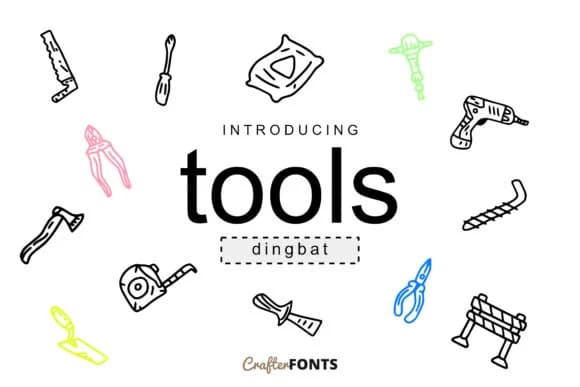
Tools Doodle by CrafterFonts is a dingbats typeface brimming with hand-drawn tool illustrations. The 62-symbol set includes everything from hammers and screwdrivers to wrenches, saws, drill bits, and safety equipment, making it ideal for hardware store packaging, workshop merchandise labels, tool rental company logos, and DIY craft project graphics. Each symbol carries that sketched, approachable style that feels personal rather than corporate, which sets it apart from clip art collections.
This font works particularly well when you're designing labels for handmade woodworking kits, decals for a contractor's truck wrap, or editorial elements in home improvement guides and maker blogs. The vector-based construction means you can scale freely without losing definition, whether you're printing small for packaging or blowing up the symbols for large-format signage. Since these are actual font characters, you can swap colors, effects, and styling through your design software just like you would with regular text, giving you flexibility that traditional graphics can't match.
Pair these icons alongside traditional typefaces for instant visual interest in posters, web graphics, and social media content related to your craft business or handyman services. When you need a straightforward way to add authentic tool imagery to your next project, grab Tools Doodle from Creative Fabrica.
Style & Use Cases
- Overall Style
- Iconographic, Doodle
- Use Case
- Icons, Accents
- Ideal For
- ornaments, bullets, and decorative flourishes
- Pairs With
- any text font
How to Install Tools Doodle Font
Step-by-step instructions for every platform
- 1Download the Tools Doodle font file (.ttf or .otf).
- 2Locate the downloaded file in your Downloads folder.
- 3Right-click the font file.
- 4Select "Install" to install for the current user, or "Install for all users" to make it available system-wide.
- 5Tools Doodle is now available in Word, Photoshop, Illustrator, and all other apps.
More by CrafterFonts
View all →
Browse fonts by theme
Curated collections →Saw a font in a picture? Identify any font from an image with our free Font Finder.
More Dingbats Fonts
Browse all →







What pairs well with Tools Doodle Font?
Tools Doodle Font is a versatile dingbats font that works for both headings and body text. Pair it with a contrasting sans-serif or serif font to add visual interest and a clear distinction between titles and body copy.



Tools Doodle Font
by CrafterFonts
Reviewed by the FontBoxDL team · Updated July 2026