 Firefox
 1 / 3
1 / 3Loading font…
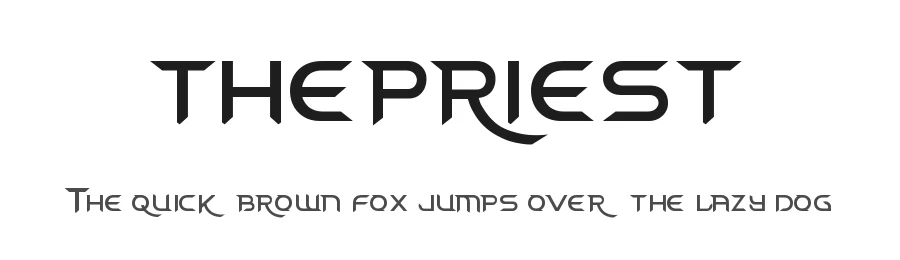
About thepriest Font
Thepriest is a display font engineered squarely around futuristic design principles. Available only in a medium weight with 57 total glyphs, this typeface demands bold, deliberate placement where its distinctive character can fully express itself. Its support for 89 Latin-based languages ensures genuine accessibility for international creative projects that need a cohesive, forward-looking visual voice.
Deploy thepriest in projects steeped in dystopian or cyberpunk aesthetics: dark-future novel covers, sci-fi themed video game user interfaces, electronic music event posters and packaging, and virtual reality environment branding all naturally align with its design character. Technology companies unveiling new product initiatives, concept artists titling their digital studio work, and experimental musicians developing distinctive album artwork will discover compelling use cases. The constrained glyph set actually encourages designers to embrace constraint-based layouts, where single-typeface simplicity becomes a genuine design strength rather than a limitation.
The font is free for personal creative use only; commercial work requires a licensing agreement from the designer. Choose thepriest specifically when you want a futuristic visual identity that confidently avoids the overused sci-fi typeface conventions currently saturating design culture. It performs best as a bold focal point in layouts where one distinctive font choice carries the entire visual weight.
Style & Use Cases
- Overall Style
- Eye-catching, Bold, Futuristic
- Use Case
- Headlines, Logos
- Ideal For
- posters, branding, and social media graphics
- Pairs With
- a readable sans or serif for body
thepriest Specifications
| Font Family | thepriest |
| Style | Medium |
| Full Name | thepriest |
| Version | 001.000 |
| Weight | 500 (Medium) |
| Glyph Count | 57 glyphs |
| PostScript Name | thepriest |
| Format | TTF (TrueType) |
| File Size | 12.8 KB |
Languages Supported
thepriest supports 89 languages.
How to Install thepriest Font
Step-by-step instructions for every platform
- 1Download the thepriest font file (.ttf or .otf).
- 2Locate the downloaded file in your Downloads folder.
- 3Right-click the font file.
- 4Select "Install" to install for the current user, or "Install for all users" to make it available system-wide.
- 5thepriest is now available in Word, Photoshop, Illustrator, and all other apps.
Browse fonts by theme
Curated collections →Saw a font in a picture? Identify any font from an image with our free Font Finder.
More Display Fonts
Browse all →







What pairs well with thepriest Font?
thepriest Font is a display font that shines as a display or heading face. Pair it with a clean sans-serif or serif font for body text — the contrast creates a clear hierarchy while the two styles stay balanced and easy to read.




Premium Display Fonts
★ PremiumWant something with more weights, glyphs, and commercial polish? These premium display fonts are worth a look.

thepriest Font
Reviewed by the FontBoxDL team · Updated October 2026
License: Free for personal use