 Firefox
 1 / 5
1 / 5About Theater Act JNL Font
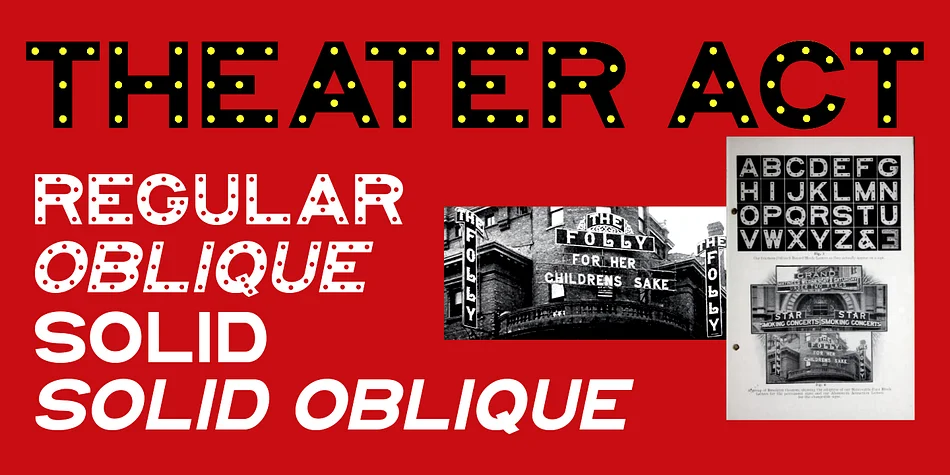
In the early days of illuminated theater signage, before fluoresecent panels and interchangeable plastic letters were the norm, theater managers relied on prefabricated letters with sockets for holding incandescent bulbs to showcase their acts and movies.
One manufacturer of these letters was the Metropolitan Engineering Company located in Brooklyn, New York. A page from their 1906 Electric Signs catalog provided a set of characters which have new been recreated digitally as Theater Act JNL - available in both regular and oblique versions.
For those who want to use a color back fill or simply have an alternate version of this type design for contrasting text, there is also Theater Act Solid JNL - also in regular and oblique versions.
Style & Use Cases
- Overall Style
- Eye-catching, Bold
- Use Case
- Headlines, Logos
- Ideal For
- posters, branding, and social media graphics
- Pairs With
- a readable sans or serif for body
How to Install Theater Act JNL Font
Step-by-step instructions for every platform
- 1Download the Theater Act JNL font file (.ttf or .otf).
- 2Locate the downloaded file in your Downloads folder.
- 3Right-click the font file.
- 4Select "Install" to install for the current user, or "Install for all users" to make it available system-wide.
- 5Theater Act JNL is now available in Word, Photoshop, Illustrator, and all other apps.
More by Jeff Levine Fonts
View all →
Browse fonts by theme
Curated collections →Saw a font in a picture? Identify any font from an image with our free Font Finder.
More Display Fonts
Browse all →







What pairs well with Theater Act JNL Font?
Theater Act JNL Font is a display font that shines as a display or heading face. Pair it with a clean sans-serif or serif font for body text — the contrast creates a clear hierarchy while the two styles stay balanced and easy to read.




Theater Act JNL Font
Reviewed by the FontBoxDL team · Updated April 2026