
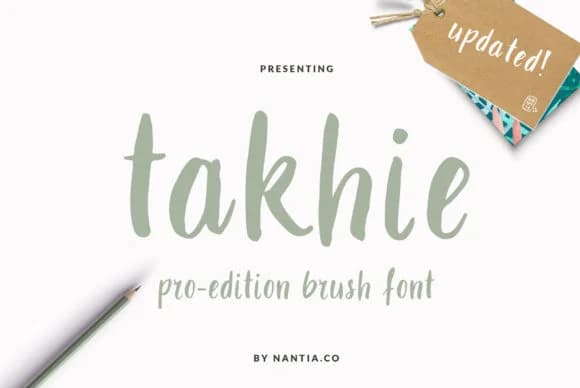
 1 / 4
1 / 4About Takhie Font
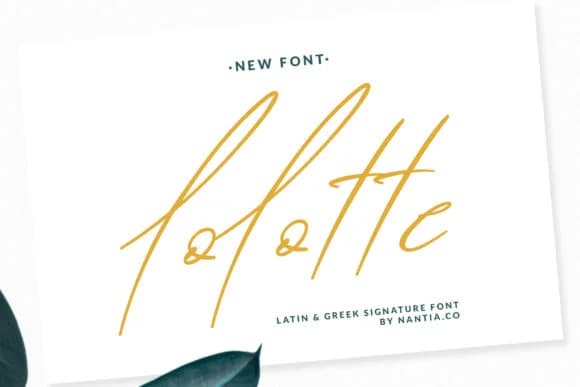
This script typeface strikes a friendly, approachable tone without feeling overly casual or trendy in its execution. Takhie Font by nantia delivers that balance through clean letterforms with contemporary character, making it surprisingly versatile across a range of projects.
The script excels for wedding invitation suites, hand-lettered brand logos, boutique cosmetics and skincare packaging, and DIY craft signage that needs to feel personal and authentic. It also shines on gift tags, greeting cards, and custom product labels where authenticity matters most. Beyond straightforward display use, its consistent letterforms remain legible even at smaller sizes, which opens possibilities for personal stationery, detailed label applications, and watermark-style branding on product identities. This typeface includes both regular and bold weights, giving you natural options for creating visual hierarchy and emphasis within a single font file. At larger scales or in intimate layouts, Takhie adapts with equal grace.
The letterforms maintain a modern polish and refinement while preserving that personal, handwritten warmth, the quality that makes designs feel genuine rather than generic or mass-produced. Pair it with a clean geometric sans-serif like Montserrat or Lato for supporting text and body copy to maintain visual contrast. Grab it on Creative Fabrica and start adding character to your next project.
Style & Use Cases
- Overall Style
- Elegant, Flowing, Takhie
- Use Case
- Invitations, Branding
- Ideal For
- wedding stationery, greeting cards, and signatures
- Pairs With
- a simple uppercase sans
How to Install Takhie Font Font
Step-by-step instructions for every platform
- 1Download the Takhie Font font file (.ttf or .otf).
- 2Locate the downloaded file in your Downloads folder.
- 3Right-click the font file.
- 4Select "Install" to install for the current user, or "Install for all users" to make it available system-wide.
- 5Takhie Font is now available in Word, Photoshop, Illustrator, and all other apps.
More Script Handwritten Fonts
Browse all →







What pairs well with Takhie Font?
Takhie Font is a script font that shines as a display or heading face. Pair it with a clean sans-serif or serif font for body text — the contrast creates a clear hierarchy while the two styles stay balanced and easy to read.



Takhie Font
by nantia
Reviewed by the FontBoxDL team · Updated August 2026