 Firefox
 1 / 8
1 / 8About Sweetie Doodle Font
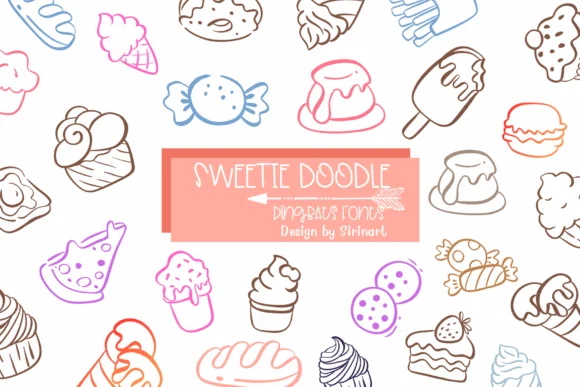
This font radiates playfulness through every doodle. Sweetie Doodle by Sirinart is a dingbats collection packed with hand-drawn food icons: cupcakes, donuts, ice cream, burgers, candies, cookies, bread, and cakes all rendered as simple outline characters. Each icon has a charming, sketch-like quality that feels genuinely handmade rather than digitally sterile, giving any design a friendly, approachable vibe.
What makes this font shine is its versatility across food and craft projects. Bakery menu boards become more inviting when sprinkled with these icons across the layout. Etsy sellers rely on them for product label designs that stand out without overwhelming the actual packaging. Birthday invitation suites gain instant personality through scattered doodles throughout the card. Sublimation enthusiasts can layer them onto mugs, t-shirts, and blanks for that authentic homemade-shop aesthetic customers crave. The line-work style translates beautifully to children's books, scrapbook layouts, and social media posts that need visual warmth and culinary charm.
Pair Sweetie Doodle with a clean sans-serif for body text and you've got a balanced, friendly design system that works across formats. You'll find this font on Creative Fabrica, ready to add some genuine sweetness to your next project.
Style & Use Cases
- Overall Style
- Iconographic, Dingbats Font
- Use Case
- Icons, Accents
- Ideal For
- ornaments, bullets, and decorative flourishes
- Pairs With
- any text font
How to Install Sweetie Doodle Font
Step-by-step instructions for every platform
- 1Download the Sweetie Doodle font file (.ttf or .otf).
- 2Locate the downloaded file in your Downloads folder.
- 3Right-click the font file.
- 4Select "Install" to install for the current user, or "Install for all users" to make it available system-wide.
- 5Sweetie Doodle is now available in Word, Photoshop, Illustrator, and all other apps.
More by Sirinart
View all →

Browse fonts by theme
Curated collections →Saw a font in a picture? Identify any font from an image with our free Font Finder.
More Dingbats Fonts
Browse all →







What pairs well with Sweetie Doodle Font?
Sweetie Doodle Font is a versatile dingbats font that works for both headings and body text. Pair it with a contrasting sans-serif or serif font to add visual interest and a clear distinction between titles and body copy.




Sweetie Doodle Font
by Sirinart
Reviewed by the FontBoxDL team · Updated June 2026