 Firefox
 1 / 6
1 / 6About Flower Doodle Font
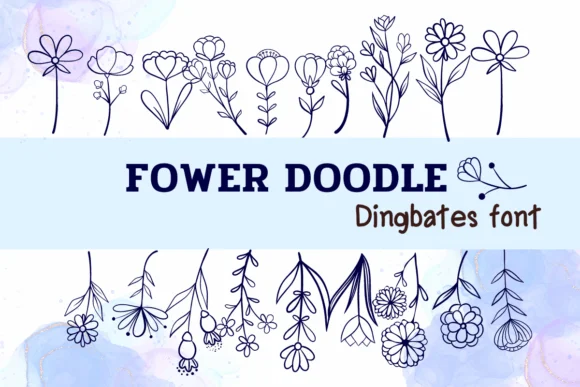
Flower Doodle by Sirinart is a hand-drawn dingbats font built around sketch-style botanical elements and organic mark-making. The character set includes florals, leaves, stems, and scattered line work that all read as part of a cohesive hand-drawn system. These marks layer beautifully into wedding invitation suites, personalized greeting cards, hand-lettered quotation designs, and boutique skincare packaging where the authenticity of the illustration style is part of the brand story.
The informal sketch quality sits in that sweet spot between polished and loose, authentic without looking rough or unfinished. Use these dingbats as background texture, as borders framing headlines, or scattered throughout empty space where they enhance rather than overwhelm a layout. From social media graphics to DIY craft signage, from scrapbooking spreads to Etsy product labels, from boutique packaging flourishes to website design elements, each composition benefits from the same hand-made aesthetic that reads as intentional and personal. Individual pieces work alone or combined without losing coherence.
Grab Flower Doodle on Creative Fabrica and start working these botanical ornaments into your projects, whether you're building something small and personal or a large-scale commission where the sketch marks feel right at home adding that touch of care and intentionality that people actually notice.
Style & Use Cases
- Overall Style
- Iconographic, Dingbats Fonts
- Use Case
- Icons, Accents
- Ideal For
- ornaments, bullets, and decorative flourishes
- Pairs With
- any text font
How to Install Flower Doodle Font
Step-by-step instructions for every platform
- 1Download the Flower Doodle font file (.ttf or .otf).
- 2Locate the downloaded file in your Downloads folder.
- 3Right-click the font file.
- 4Select "Install" to install for the current user, or "Install for all users" to make it available system-wide.
- 5Flower Doodle is now available in Word, Photoshop, Illustrator, and all other apps.
More by Sirinart
View all →

Browse fonts by theme
Curated collections →Saw a font in a picture? Identify any font from an image with our free Font Finder.
More Dingbats Fonts
Browse all →







What pairs well with Flower Doodle Font?
Flower Doodle Font is a versatile dingbats font that works for both headings and body text. Pair it with a contrasting sans-serif or serif font to add visual interest and a clear distinction between titles and body copy.




Flower Doodle Font
by Sirinart
Reviewed by the FontBoxDL team · Updated June 2026