
 1 / 6
1 / 6About Sweeta Font
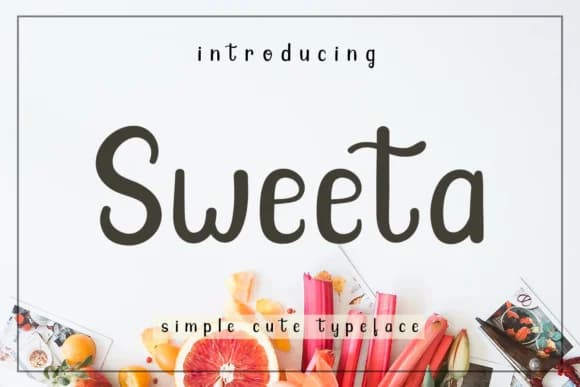
Sweeta Font by josgandos is a playful handwritten script with a loose, brush-like character that brings genuine personality to contemporary design work. The font's exceptional legibility means it functions effectively whether readers encounter your designs in print or on screen, across various scales and applications. This approachable typeface excels in projects that prioritize authenticity and human warmth over formal constraint, making it an ideal choice for brands seeking character.
The script shines when applied to wedding invitation suites, where its friendly, accessible tone creates inviting stationery without unnecessary formality. Product labels for artisan goods and small-batch makers benefit from its hand-drawn aesthetic, helping establish distinctive brand identity in competitive markets. Greeting card designs, event signage, and packaging for boutique food or skincare brands all gain visual distinction from Sweeta's dynamic letterforms and approachable personality.
What distinguishes Sweeta is how its brush-based construction maintains clarity and impact across different sizes while preserving its characteristic warmth. The font works equally well whether you're designing individual pieces or coordinating entire branded systems. Discover Sweeta on Creative Fabrica and add this contemporary handwritten sensibility to your next creative project.
Style & Use Cases
- Overall Style
- Elegant, Flowing, Sweeta
- Use Case
- Invitations, Branding
- Ideal For
- wedding stationery, greeting cards, and signatures
- Pairs With
- a simple uppercase sans
How to Install Sweeta Font Font
Step-by-step instructions for every platform
- 1Download the Sweeta Font font file (.ttf or .otf).
- 2Locate the downloaded file in your Downloads folder.
- 3Right-click the font file.
- 4Select "Install" to install for the current user, or "Install for all users" to make it available system-wide.
- 5Sweeta Font is now available in Word, Photoshop, Illustrator, and all other apps.
More by josgandos
View all →
More Script Handwritten Fonts
Browse all →







What pairs well with Sweeta Font?
Sweeta Font is a script font that shines as a display or heading face. Pair it with a clean sans-serif or serif font for body text — the contrast creates a clear hierarchy while the two styles stay balanced and easy to read.



Sweeta Font
by josgandos
Reviewed by the FontBoxDL team · Updated May 2026