 Firefox
 1 / 8
1 / 8About Sweet Candy Font
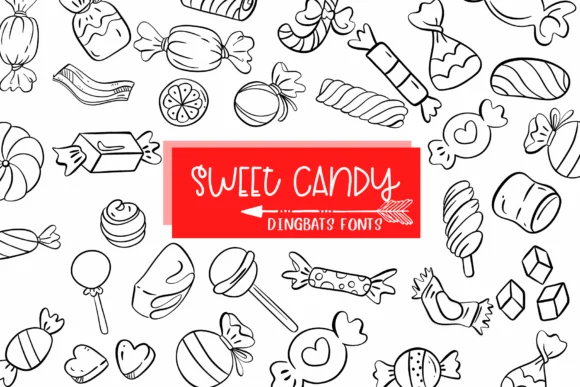
This font radiates pure nostalgia and playfulness, taking you straight back to childhood. Sweet Candy by Sirinart transforms your letters into individual candy characters, creating that instant delight and wonder in every design.
Built as a dingbat font, each character maps to a different candy shape, giving you a complete visual alphabet of confections. The range (lollipops, gumdrops, candy canes, bonbons, caramels, and more) keeps designs feeling fresh and varied rather than repetitive. Birthday cake toppers work beautifully, but the real applications span much further: Halloween candy bowl labels that set the seasonal mood perfectly, children's storybook illustrations that kids will actually linger over, baby shower invitations with genuine homemade-craft charm, and festive gift tags that capture attention at a glance. Scrapbooking pages gain tremendous visual personality from the texture and character it brings, while holiday party menus, event programs, and seasonal greeting designs all feel absolutely right with this playful typeface.
Pair Sweet Candy with a clean, rounded sans-serif for any accompanying text or body copy, which keeps the overall design balanced and ensures legibility remains strong throughout. You'll find it ready to download and integrate into your projects on Creative Fabrica.
Style & Use Cases
- Overall Style
- Iconographic, Candy
- Use Case
- Icons, Accents
- Ideal For
- ornaments, bullets, and decorative flourishes
- Pairs With
- any text font
How to Install Sweet Candy Font
Step-by-step instructions for every platform
- 1Download the Sweet Candy font file (.ttf or .otf).
- 2Locate the downloaded file in your Downloads folder.
- 3Right-click the font file.
- 4Select "Install" to install for the current user, or "Install for all users" to make it available system-wide.
- 5Sweet Candy is now available in Word, Photoshop, Illustrator, and all other apps.
More by Sirinart
View all →

Browse fonts by theme
Curated collections →Saw a font in a picture? Identify any font from an image with our free Font Finder.
More Dingbats Fonts
Browse all →






What pairs well with Sweet Candy Font?
Sweet Candy Font is a versatile dingbats font that works for both headings and body text. Pair it with a contrasting sans-serif or serif font to add visual interest and a clear distinction between titles and body copy.




Sweet Candy Font
by Sirinart
Reviewed by the FontBoxDL team · Updated July 2026