 Firefox
 1 / 4
1 / 4About Stars Font
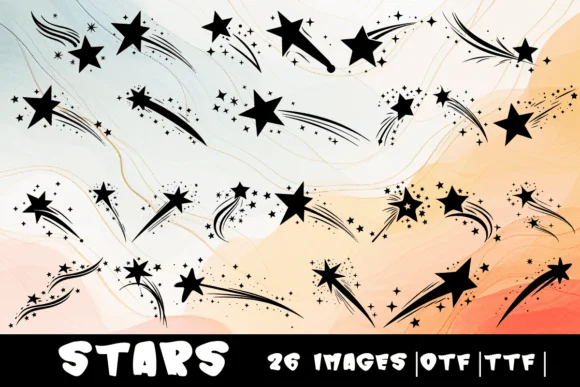
This font captures that magical pull of looking up at the night sky and seeing something wonder-filled unfold. Stars from MOMAT THIRTYONE is a dingbat collection where each letter A through Z transforms into its own twinkling star character, ready to scatter across your designs with instant cosmic flair.
The set arrives in both OTF and TTF formats, giving you format flexibility across Adobe Creative Suite, Affinity software, and other design tools you might use. Consider using Stars for celestial-themed wedding invitations, astronomy-inspired book covers, constellation activity guides for children's educational projects, or whimsical labels for artisanal cosmetics and small-batch goods. Each character works beautifully as a decorative element, letting you build patterns and visual texture without hunting for external clip art or supplementary graphics. The simplicity of working with a full alphabet of stars means you can layer them, repeat them, or mix them into layouts quickly.
Pair Stars with a structured sans-serif, like a clean geometric typeface, to anchor your layouts and provide sharp contrast against the playful star characters. The combination gives you sophistication balanced with whimsy, a dynamic that works across both print and digital formats. Adding Stars to your Creative Fabrica collection gives you instant access to any celestial project that calls for a touch of cosmic wonder.
Style & Use Cases
- Overall Style
- Iconographic, Stars
- Use Case
- Icons, Accents
- Ideal For
- ornaments, bullets, and decorative flourishes
- Pairs With
- any text font
How to Install Stars Font
Step-by-step instructions for every platform
- 1Download the Stars font file (.ttf or .otf).
- 2Locate the downloaded file in your Downloads folder.
- 3Right-click the font file.
- 4Select "Install" to install for the current user, or "Install for all users" to make it available system-wide.
- 5Stars is now available in Word, Photoshop, Illustrator, and all other apps.
More by MOMAT THIRTYONE
View all →



Browse fonts by theme
Curated collections →Saw a font in a picture? Identify any font from an image with our free Font Finder.
More Dingbats Fonts
Browse all →







What pairs well with Stars Font?
Stars Font is a versatile dingbats font that works for both headings and body text. Pair it with a contrasting sans-serif or serif font to add visual interest and a clear distinction between titles and body copy.




Stars Font
Reviewed by the FontBoxDL team · Updated July 2026