 Firefox
 1 / 8
1 / 8About Star Retro Font
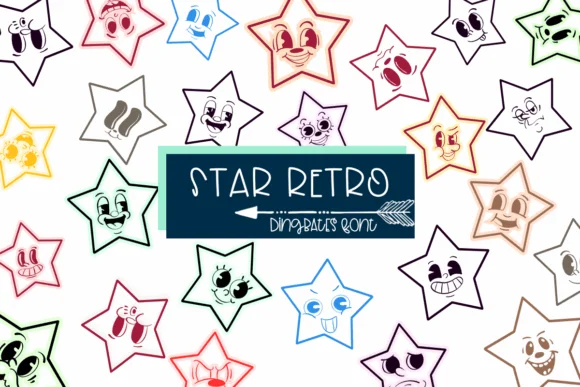
Star Retro by Sirinart brings dingbat design rooted in genuine 70s personality. Each star character wears a wide, friendly grin and channels the unmistakable visual language of that era: groovy, psychedelic, and unapologetically retro. The typeface doesn't parody the aesthetic; it inhabits it fully, which gives the entire set a coherence that scattered nostalgic references simply cannot match.
This typeface finds natural application in vintage poster layouts, bespoke merchandise labels for retro-minded independent shops, quirky greeting card suites, and custom sticker sheet designs. The font comes in both OTF and TTF formats and works with Procreate, Affinity Designer, and Affinity Photo, making it accessible whether you're working digitally or in hybrid workflows. Sirinart populated the character set with a full extended dingbat library that stays authentic to 70s visual vocabulary, so you get real flexibility for layering multiple graphic elements without veering toward visual redundancy or clutter.
Star Retro belongs in the toolkit of designers building nostalgic brand identities or casual creative projects that lean into humor and genuine warmth. Find it on Creative Fabrica and bring that era-authentic retro charm to your next design.
Style & Use Cases
- Overall Style
- Iconographic, Fonts
- Use Case
- Icons, Accents
- Ideal For
- ornaments, bullets, and decorative flourishes
- Pairs With
- any text font
How to Install Star Retro Font
Step-by-step instructions for every platform
- 1Download the Star Retro font file (.ttf or .otf).
- 2Locate the downloaded file in your Downloads folder.
- 3Right-click the font file.
- 4Select "Install" to install for the current user, or "Install for all users" to make it available system-wide.
- 5Star Retro is now available in Word, Photoshop, Illustrator, and all other apps.
More by Sirinart
View all →

Browse fonts by theme
Curated collections →Saw a font in a picture? Identify any font from an image with our free Font Finder.
More Dingbats Fonts
Browse all →







What pairs well with Star Retro Font?
Star Retro Font is a versatile dingbats font that works for both headings and body text. Pair it with a contrasting sans-serif or serif font to add visual interest and a clear distinction between titles and body copy.




Star Retro Font
by Sirinart
Reviewed by the FontBoxDL team · Updated July 2026