 Firefox
 1 / 8
1 / 8Loading font…
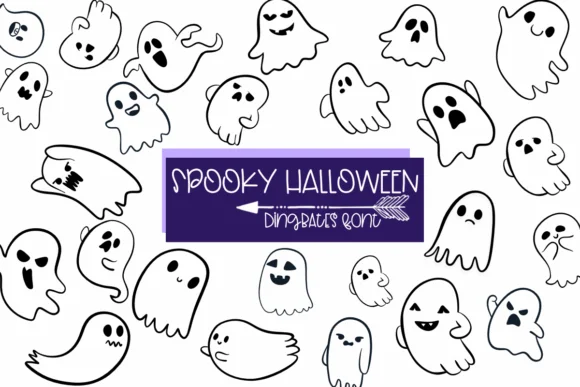
About Spooky Halloween Font
Picture yourself designing a Halloween invitation suite in mid-September, hunting for something that feels handmade rather than generic. Spooky Halloween, created by Sirinart, is exactly what you need: a dingbats font built on sketch-style icons that land somewhere between playful and spooky. Instead of handling individual text characters, each keystroke becomes a usable graphic element.
The font shines for specific projects: Halloween invitation suites with coordinating icon headers, trick-or-treat bag labels that need quick repetition, scrapbook page overlays, and merchandise designs like t-shirt graphics or tote bag prints. Since it comes in both OTF and TTF formats, it integrates smoothly into Procreate, Affinity Designer, and Affinity Photo. Coloring and outline variants give you flexibility for layering effects, solid fills, or hand-lettered compositions with dimensional depth.
One dingbat character scales beautifully as a repeating pattern or a single focal point, so the versatility runs deeper than most seasonal fonts. Size up to see the hand-sketched details that make this feel custom rather than stock. That attention to detail is why dingbat fonts like this one cut through the noise on social media and product photos. You'll find it on Creative Fabrica, ready to add genuine character to your Halloween designs.
Style & Use Cases
- Overall Style
- Iconographic, Halloween
- Use Case
- Icons, Accents
- Ideal For
- ornaments, bullets, and decorative flourishes
- Pairs With
- any text font
How to Install Spooky Halloween Font
Step-by-step instructions for every platform
- 1Download the Spooky Halloween font file (.ttf or .otf).
- 2Locate the downloaded file in your Downloads folder.
- 3Right-click the font file.
- 4Select "Install" to install for the current user, or "Install for all users" to make it available system-wide.
- 5Spooky Halloween is now available in Word, Photoshop, Illustrator, and all other apps.
More by Sirinart
View all →

Browse fonts by theme
Curated collections →Saw a font in a picture? Identify any font from an image with our free Font Finder.
More Dingbats Fonts
Browse all →






What pairs well with Spooky Halloween Font?
Spooky Halloween Font is a versatile dingbats font that works for both headings and body text. Pair it with a contrasting sans-serif or serif font to add visual interest and a clear distinction between titles and body copy.




Spooky Halloween Font
by Sirinart
Reviewed by the FontBoxDL team · Updated October 2026