 Firefox
 1 / 8
1 / 8About Special Eyes Font
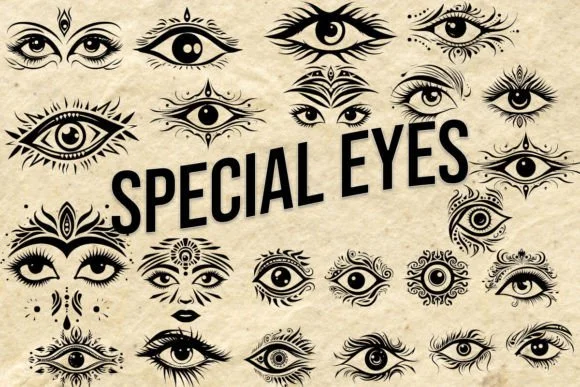
There's something playful and slightly mysterious about a well-designed eye symbol. Special Eyes by MOMAT THIRTYONE gives you a complete collection of them, each one rendered as a distinct character ready to tell its own visual story. The glyphs span from wide-eyed wonder to knowing glances and cryptic stares, built to work as standalone graphic elements or layered into illustration work. You get real variety here, which matters when the eye itself is the message you're trying to send.
This is the font you reach for when designing mystery board game components and packaging, illustrated logic puzzle worksheets for kids, or escape room promotional materials. You'll use it on eye-spy and spot-the-difference game cards, or woven through a character expression guide where you need quick visual shorthand for different emotions and states of mind. The glyph set's range means you can mix and match freely to create visual rhythm without leaning on the same symbol twice in a row.
Pair Special Eyes with a clean geometric sans-serif to ground your layouts and give the symbolism room to breathe. You'll find it on Creative Fabrica, ready to add visual wit and playful intrigue to whatever puzzle-themed or enigmatic project comes your way.
Style & Use Cases
- Overall Style
- Iconographic, Dingbats
- Use Case
- Icons, Accents
- Ideal For
- ornaments, bullets, and decorative flourishes
- Pairs With
- any text font
How to Install Special Eyes Font
Step-by-step instructions for every platform
- 1Download the Special Eyes font file (.ttf or .otf).
- 2Locate the downloaded file in your Downloads folder.
- 3Right-click the font file.
- 4Select "Install" to install for the current user, or "Install for all users" to make it available system-wide.
- 5Special Eyes is now available in Word, Photoshop, Illustrator, and all other apps.
More by MOMAT THIRTYONE
View all →



Browse fonts by theme
Curated collections →Saw a font in a picture? Identify any font from an image with our free Font Finder.
More Dingbats Fonts
Browse all →







What pairs well with Special Eyes Font?
Special Eyes Font is a versatile dingbats font that works for both headings and body text. Pair it with a contrasting sans-serif or serif font to add visual interest and a clear distinction between titles and body copy.




Special Eyes Font
Reviewed by the FontBoxDL team · Updated July 2026