 Firefox
 1 / 8
1 / 8About Sketch Doodle Font
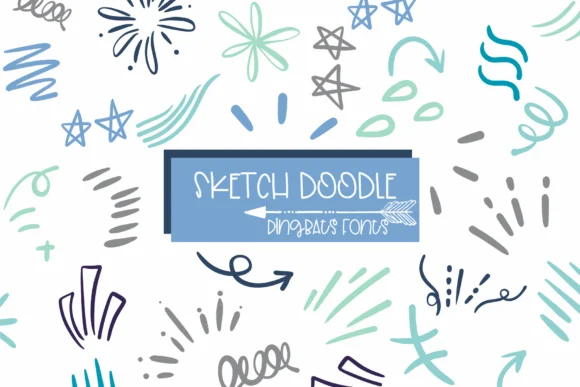
This font has a loose, unfinished quality that feels honest rather than meticulously polished. Sketch Doodle, designed by Sirinart, is a dingbats collection of hand-drawn marks, directional arrows, and decorative shapes that bring the unmistakable presence of real pencil work to any layout.
Use it for bullet journal spreads where you need frame borders and connecting visual marks between sections, DIY greeting card corner accents and custom headers, handmade Etsy sticker sheets that feel genuinely crafted instead of digitally generated, and indie branding marks for small creative businesses seeking warmth and personality. You'll also find directional arrows and decorative frames useful for scrapbook layouts, planner dividers, and decorated gift tags. The font comes in OTF, TTF, and Procreate formats, letting you work in digital illustration apps or export directly for print without limitations. Each glyph maintains that hand-sketched quality that makes finished designs feel less mass-produced and more intentional.
Pair it with a clean geometric sans-serif to create strong visual contrast and ensure readability when mixing type with illustration elements. Finding this on Creative Fabrica gives you access to a versatile marking system that instantly brings warmth to personal projects and client work alike.
Style & Use Cases
- Overall Style
- Iconographic, Doodle
- Use Case
- Icons, Accents
- Ideal For
- ornaments, bullets, and decorative flourishes
- Pairs With
- any text font
How to Install Sketch Doodle Font
Step-by-step instructions for every platform
- 1Download the Sketch Doodle font file (.ttf or .otf).
- 2Locate the downloaded file in your Downloads folder.
- 3Right-click the font file.
- 4Select "Install" to install for the current user, or "Install for all users" to make it available system-wide.
- 5Sketch Doodle is now available in Word, Photoshop, Illustrator, and all other apps.
More by Sirinart
View all →

Browse fonts by theme
Curated collections →Saw a font in a picture? Identify any font from an image with our free Font Finder.
More Dingbats Fonts
Browse all →







What pairs well with Sketch Doodle Font?
Sketch Doodle Font is a versatile dingbats font that works for both headings and body text. Pair it with a contrasting sans-serif or serif font to add visual interest and a clear distinction between titles and body copy.




Sketch Doodle Font
by Sirinart
Reviewed by the FontBoxDL team · Updated June 2026