 Firefox
 1 / 4
1 / 4About Shooting Star Font
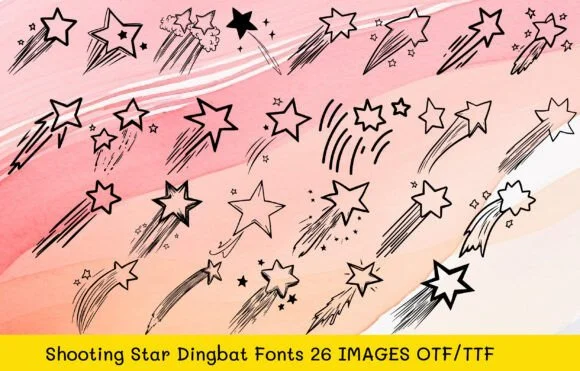
Shooting Star by MOMAT THIRTYONE is a distinctive celestial dingbat font where each letter transforms into a beautifully hand-drawn star motif. The 26 designs carry genuine personality and character, which separates them completely from generic decoration. They work as real design elements rather than empty filler, which matters when you're building visual systems with intention instead of just borrowing the first clip art you find online.
This font excels across scrapbooking layouts, custom wedding stationery, greeting card embellishments, and personalized gift wrap projects. Each individual star's meticulous craftsmanship ensures your finished work reads as intentional rather than hastily assembled from stock elements. Both OTF and TTF formats ship with the complete package, giving you flexibility across traditional print design software, smaller crafting applications, and professional printing services.
What truly distinguishes this set is the thoughtful design restraint. The playful energy never drifts into territory that feels childish or dated, which gives these characters real staying power across both professional and personal projects. The stars function equally well as subtle decorative accents or as the primary visual anchor in nearly any layout. Find Shooting Star on Creative Fabrica and start incorporating these celestial characters into your upcoming design work.
Style & Use Cases
- Overall Style
- Iconographic, Shooting Star
- Use Case
- Icons, Accents
- Ideal For
- ornaments, bullets, and decorative flourishes
- Pairs With
- any text font
How to Install Shooting Star Font
Step-by-step instructions for every platform
- 1Download the Shooting Star font file (.ttf or .otf).
- 2Locate the downloaded file in your Downloads folder.
- 3Right-click the font file.
- 4Select "Install" to install for the current user, or "Install for all users" to make it available system-wide.
- 5Shooting Star is now available in Word, Photoshop, Illustrator, and all other apps.
More by MOMAT THIRTYONE
View all →



Browse fonts by theme
Curated collections →Saw a font in a picture? Identify any font from an image with our free Font Finder.
More Dingbats Fonts
Browse all →







What pairs well with Shooting Star Font?
Shooting Star Font is a versatile dingbats font that works for both headings and body text. Pair it with a contrasting sans-serif or serif font to add visual interest and a clear distinction between titles and body copy.




Shooting Star Font
Reviewed by the FontBoxDL team · Updated July 2026