 Firefox
 1 / 8
1 / 8About Shooting Star Font
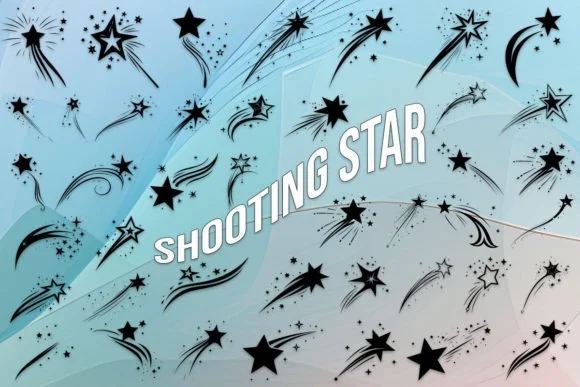
Picture designing materials for an astronomy night or constellation-themed product lineup. Shooting Star, crafted by MOMAT THIRTYONE, is a dingbats collection built entirely around celestial imagery that lets you scatter authentic cosmic elements across your work without hunting through icon libraries. With 26 uppercase characters, 26 lowercase, and numerals 0-9, you get a full toolkit of shooting stars, comets, and night-sky symbols ready to deploy at a moment's notice.
The font excels for stargazing event posters where those small cosmic details matter most, planetarium gift tags that need visual punch, and astronomy book cover ornaments that ground readers in the subject immediately. Constellation-themed wedding invitations become significantly richer with layered stellar decoration, while space-camp activity sheets and observatory promotional graphics gain instant character and visual credibility. The bold weight ensures your symbols stay crisp at display sizes, scaling equally well across poster layouts and invitation suites without any loss of definition.
Since these are pre-drawn symbols rather than traditional letterforms, every character renders clean and stays perfectly consistent at any scale you choose to work at. Grab it from Creative Fabrica and let your next project shine with real astronomical character and detail.
Style & Use Cases
- Overall Style
- Iconographic, Stars
- Use Case
- Icons, Accents
- Ideal For
- ornaments, bullets, and decorative flourishes
- Pairs With
- any text font
How to Install Shooting Star Font
Step-by-step instructions for every platform
- 1Download the Shooting Star font file (.ttf or .otf).
- 2Locate the downloaded file in your Downloads folder.
- 3Right-click the font file.
- 4Select "Install" to install for the current user, or "Install for all users" to make it available system-wide.
- 5Shooting Star is now available in Word, Photoshop, Illustrator, and all other apps.
More by MOMAT THIRTYONE
View all →



Browse fonts by theme
Curated collections →Saw a font in a picture? Identify any font from an image with our free Font Finder.
More Dingbats Fonts
Browse all →







What pairs well with Shooting Star Font?
Shooting Star Font is a versatile dingbats font that works for both headings and body text. Pair it with a contrasting sans-serif or serif font to add visual interest and a clear distinction between titles and body copy.




Shooting Star Font
Reviewed by the FontBoxDL team · Updated July 2026