 Firefox
 1 / 7
1 / 7About School Icon Font
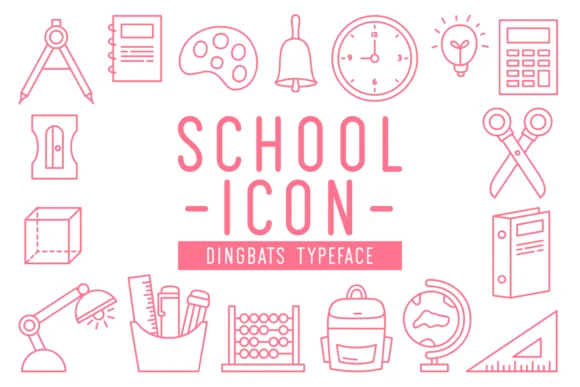
This font brings playful charm and real purpose to everyday school projects and classroom activities. School Icon, designed by Creative Keelik, is a comprehensive dingbat collection built for teachers, crafters, and anyone creating educational resources who values both quick visual shortcuts and honest, genuinely likeable design.
These icons truly come alive in everyday, practical applications: classroom posters that need real visual punch, DIY worksheets for young learners, and handmade greeting cards marking school milestones and student achievements. Educators use them in printable workbooks and comprehensive teacher resource bundles, while crafters incorporate them on custom t-shirts, personalized pencil cases, and small craft projects meant as classroom gifts. The icons also fit naturally into educational landing pages, seasonal back-to-school marketing campaigns, and digital magazine spreads where visual clarity and personality matter most to busy creators.
The consistent, confident line work and varied symbol set give you surprising flexibility across both small and larger-scale projects. To complete any layout, pair School Icon with a clean sans-serif like Open Sans for readable body text that benefits from these graphic marks sitting alongside it. Grab it from Creative Fabrica, and you'll find yourself reaching for these icons again and again in your design work.
Style & Use Cases
- Overall Style
- Iconographic, Dingbats
- Use Case
- Icons, Accents
- Ideal For
- ornaments, bullets, and decorative flourishes
- Pairs With
- any text font
How to Install School Icon Font
Step-by-step instructions for every platform
- 1Download the School Icon font file (.ttf or .otf).
- 2Locate the downloaded file in your Downloads folder.
- 3Right-click the font file.
- 4Select "Install" to install for the current user, or "Install for all users" to make it available system-wide.
- 5School Icon is now available in Word, Photoshop, Illustrator, and all other apps.
More by Creative Keelik
View all →
Browse fonts by theme
Curated collections →Saw a font in a picture? Identify any font from an image with our free Font Finder.
More Dingbats Fonts
Browse all →







What pairs well with School Icon Font?
School Icon Font is a versatile dingbats font that works for both headings and body text. Pair it with a contrasting sans-serif or serif font to add visual interest and a clear distinction between titles and body copy.




School Icon Font
Reviewed by the FontBoxDL team · Updated June 2026