 Firefox
 1 / 6
1 / 6About Say Hi Spooky Font
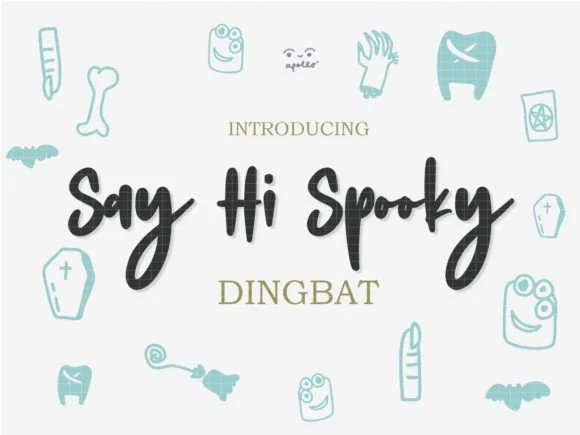
Picture yourself designing a Halloween party invitation suite with custom silhouettes of bats and moons scattered across the card. Say Hi Spooky, created by Apollo no.64, is a hand-drawn dingbats font that captures that playful spooky energy perfectly. The collection includes witches, ghosts, skulls, black cats, and moon shapes, each one drawn with genuine charm.
This font works beautifully for trick-or-treat bag labels where you want something more personal than store-bought stickers. It's equally at home on witchy Etsy product pages, spooky greeting card sets, and Halloween-themed event signage for haunted houses or autumn parties. The hand-drawn quality feels intentional and crafted, which stands out compared to more sterile alternatives. What makes it versatile is the mix of genuinely creepy and genuinely cute elements, so it works for adult horror vibes and kids' craft projects alike.
The character set includes all the silhouettes mentioned plus various supporting shapes that layer beautifully at any size. From poster scale down to small social media graphics, the linework stays crisp and readable. Grab Say Hi Spooky on Creative Fabrica and bring some hand-drawn charm to your October designs.
Style & Use Cases
- Overall Style
- Iconographic, Ghost
- Use Case
- Icons, Accents
- Ideal For
- ornaments, bullets, and decorative flourishes
- Pairs With
- any text font
How to Install Say Hi Spooky Font
Step-by-step instructions for every platform
- 1Download the Say Hi Spooky font file (.ttf or .otf).
- 2Locate the downloaded file in your Downloads folder.
- 3Right-click the font file.
- 4Select "Install" to install for the current user, or "Install for all users" to make it available system-wide.
- 5Say Hi Spooky is now available in Word, Photoshop, Illustrator, and all other apps.
More by Apollo no.64
View all →
Browse fonts by theme
Curated collections →Saw a font in a picture? Identify any font from an image with our free Font Finder.
More Dingbats Fonts
Browse all →







What pairs well with Say Hi Spooky Font?
Say Hi Spooky Font is a versatile dingbats font that works for both headings and body text. Pair it with a contrasting sans-serif or serif font to add visual interest and a clear distinction between titles and body copy.




Say Hi Spooky Font
by Apollo no.64
Reviewed by the FontBoxDL team · Updated July 2026