 Firefox
 1 / 8
1 / 8About Cute Doggy Font
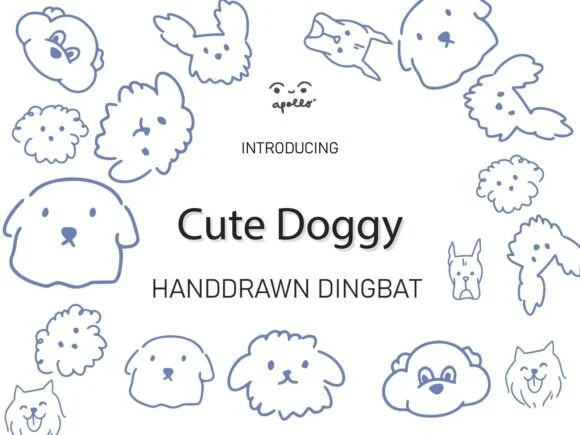
Cute Doggy by Apollo no.64 is a hand-drawn dingbat font packed with expressive puppy illustrations and dog breed characters in a clean, monolinear style. You get everything from perky terriers to friendly retrievers, all designed to work as individual dingbat characters that drop straight into your layouts. The monolinear approach keeps these illustrations readable at any scale, from signage down to social media.
This typeface shines for specific design jobs: custom pet supply packaging, dog walking service business cards, dog-themed greeting cards, and local animal shelter fundraiser flyers. Designers working on pet-focused branding appreciate how the hand-drawn charm pairs well with modern typefaces without looking mismatched. You can layer these characters over solid backgrounds, use them as spot illustrations, or build full compositions with repeating dogs across a design.
The versatility comes from each character functioning as a complete illustration rather than a typographic element. Print projects hold up well since the outlines are intentionally bold enough to avoid filling in or losing detail. Pair Cute Doggy with a clean sans-serif and you have something that reads as contemporary but still feels warm. Grab it from Creative Fabrica and watch how it transforms pet-related projects into designs with genuine personality.
Style & Use Cases
- Overall Style
- Iconographic, Clip Art
- Use Case
- Icons, Accents
- Ideal For
- ornaments, bullets, and decorative flourishes
- Pairs With
- any text font
How to Install Cute Doggy Font
Step-by-step instructions for every platform
- 1Download the Cute Doggy font file (.ttf or .otf).
- 2Locate the downloaded file in your Downloads folder.
- 3Right-click the font file.
- 4Select "Install" to install for the current user, or "Install for all users" to make it available system-wide.
- 5Cute Doggy is now available in Word, Photoshop, Illustrator, and all other apps.
More by Apollo no.64
View all →
Browse fonts by theme
Curated collections →Saw a font in a picture? Identify any font from an image with our free Font Finder.
More Dingbats Fonts
Browse all →







What pairs well with Cute Doggy Font?
Cute Doggy Font is a versatile dingbats font that works for both headings and body text. Pair it with a contrasting sans-serif or serif font to add visual interest and a clear distinction between titles and body copy.




Cute Doggy Font
by Apollo no.64
Reviewed by the FontBoxDL team · Updated June 2026