
 1 / 9
1 / 9About Roseanne Font
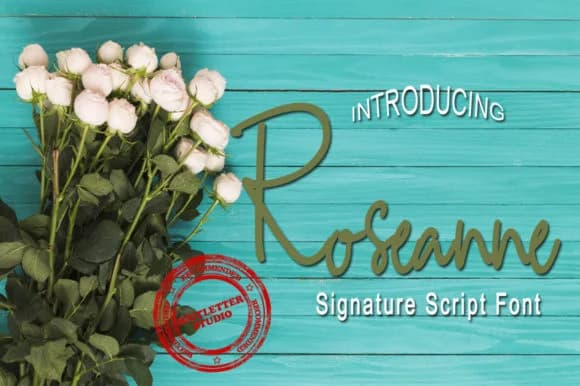
Imagine a bride reviewing wedding invitation samples when one catches her eye, something with authentic handwritten flair. Roseanne Font, from icutletterstudio, delivers exactly that flowing, signature-like quality designers reach for when they need work to feel genuinely personalized rather than mass-produced.
This typeface carries real elegance without any pretension. On luxury packaging for boutique skincare brands, it brings the kind of authenticity that customers notice. Wine labels gain character when you set them in Roseanne, and they command shelf presence. Personalized greeting cards read better and feel more intentional, more like something that came from a real person. Custom apparel labels look like they were designed by hand. Blog headers draw more attention when they use this script. Decorative quotes feel warmer when set in Roseanne. Even standard stationery develops presence and depth. The handwritten quality works for logos and signage too, when you want that human touch rather than corporate precision.
What makes Roseanne genuinely practical is how clearly it reads at larger sizes, letting you keep all that personality without sacrificing legibility from a distance. The letterforms move with confidence. Find it on Creative Fabrica and add it to work that needs both grace and real substance.
Style & Use Cases
- Overall Style
- Elegant, Flowing, Roseanne
- Use Case
- Invitations, Branding
- Ideal For
- wedding stationery, greeting cards, and signatures
- Pairs With
- a simple uppercase sans
How to Install Roseanne Font Font
Step-by-step instructions for every platform
- 1Download the Roseanne Font font file (.ttf or .otf).
- 2Locate the downloaded file in your Downloads folder.
- 3Right-click the font file.
- 4Select "Install" to install for the current user, or "Install for all users" to make it available system-wide.
- 5Roseanne Font is now available in Word, Photoshop, Illustrator, and all other apps.
More by icutletterstudio
View all →
More Script Handwritten Fonts
Browse all →







What pairs well with Roseanne Font?
Roseanne Font is a script font that shines as a display or heading face. Pair it with a clean sans-serif or serif font for body text — the contrast creates a clear hierarchy while the two styles stay balanced and easy to read.



Roseanne Font
Reviewed by the FontBoxDL team · Updated June 2026