
 1 / 6
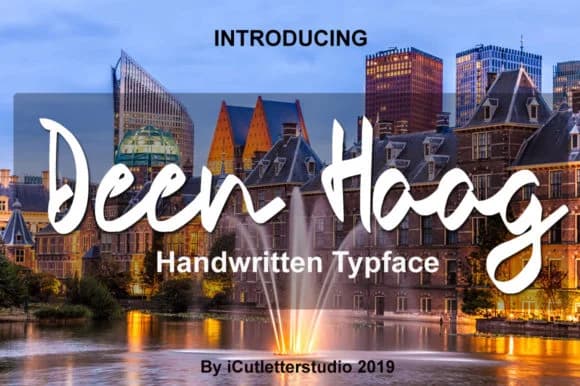
1 / 6About Deen Haag Font
Deen Haag by icutletterstudio is a contemporary hand-lettered script that merges refined elegance with genuine visual presence and character. For wedding invitation suites, the flowing letterforms command attention on premium cardstock, delivering that handcrafted authenticity clients expect without sacrificing legibility or polish. The same approach works beautifully for boutique product labels on artisan skincare packaging, small-batch food items, and luxury goods that rely on handwritten warmth to signal quality and care.
Beyond the obvious print applications, this typeface shines wherever branding work needs personality and a genuine human touch. Menu card design, website headers for creative agency portfolios, event stationery, and custom gift tag designs all benefit from the letterforms' distinctive character and sophisticated flow. The script occupies that practical middle ground between purely decorative display faces and everyday workhorse typefaces, making it genuinely reliable for designs that demand warmth alongside professionalism and readable letterforms. It won't overpower your layouts, yet it never disappears into the background either.
Finding a hand-lettered script that truly works across different project types and scales is harder than it actually sounds. Deen Haag is definitely worth testing on your next upscale branding brief or wedding invitation suite, and you can grab it directly from Creative Fabrica.
Style & Use Cases
- Overall Style
- Elegant, Flowing, Deen Haag
- Use Case
- Invitations, Branding
- Ideal For
- wedding stationery, greeting cards, and signatures
- Pairs With
- a simple uppercase sans
How to Install Deen Haag Font Font
Step-by-step instructions for every platform
- 1Download the Deen Haag Font font file (.ttf or .otf).
- 2Locate the downloaded file in your Downloads folder.
- 3Right-click the font file.
- 4Select "Install" to install for the current user, or "Install for all users" to make it available system-wide.
- 5Deen Haag Font is now available in Word, Photoshop, Illustrator, and all other apps.
More by icutletterstudio
View all →
More Script Handwritten Fonts
Browse all →







What pairs well with Deen Haag Font?
Deen Haag Font is a script font that shines as a display or heading face. Pair it with a clean sans-serif or serif font for body text — the contrast creates a clear hierarchy while the two styles stay balanced and easy to read.



Deen Haag Font
Reviewed by the FontBoxDL team · Updated June 2026