 Firefox
 1 / 4
1 / 4About Rose Rose Font
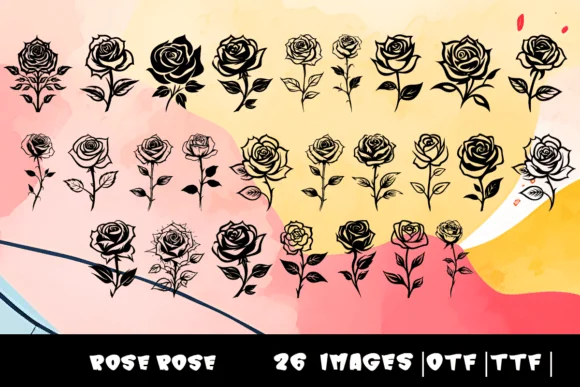
Each character in Rose Rose, designed by MOMAT THIRTYONE, swaps traditional letterforms for intricately layered botanical blooms. This dingbat font transforms the 26-letter alphabet into individual rose illustrations, making it possible to compose floral arrangements using only your keyboard. Both OTF and TTF file formats are included, so you can work comfortably within your preferred design software, whether that's a vector editor, layout program, or image tool.
Wedding invitation suites gain immediate sophistication when you use Rose Rose for decorative elements or as accent text. Valentine's Day cards, botanical greeting cards, and romantic scrapbook layouts all benefit from its authentic rose construction. Boutique stationery designers often combine these character sets with clean serif or sans-serif typefaces to build cohesive brand identities, while hand-lettering enthusiasts and craft practitioners rely on it for custom card making, DIY gift tags, and personalized packaging. The hand-drawn quality embedded in each bloom conveys an artisanal, organic presence that typed text or clip-art elements simply can't match.
Use Rose Rose when your project requires actual floral ornaments rather than decorative photo backgrounds. It's ideal for designers who want botanical authenticity without the production complexity of scanning hand-drawn imagery. Pick it up on Creative Fabrica for straightforward licensing and immediate creative access.
Style & Use Cases
- Overall Style
- Iconographic, Roses
- Use Case
- Icons, Accents
- Ideal For
- ornaments, bullets, and decorative flourishes
- Pairs With
- any text font
How to Install Rose Rose Font
Step-by-step instructions for every platform
- 1Download the Rose Rose font file (.ttf or .otf).
- 2Locate the downloaded file in your Downloads folder.
- 3Right-click the font file.
- 4Select "Install" to install for the current user, or "Install for all users" to make it available system-wide.
- 5Rose Rose is now available in Word, Photoshop, Illustrator, and all other apps.
More by MOMAT THIRTYONE
View all →



Browse fonts by theme
Curated collections →Saw a font in a picture? Identify any font from an image with our free Font Finder.
More Dingbats Fonts
Browse all →







What pairs well with Rose Rose Font?
Rose Rose Font is a versatile dingbats font that works for both headings and body text. Pair it with a contrasting sans-serif or serif font to add visual interest and a clear distinction between titles and body copy.




Rose Rose Font
Reviewed by the FontBoxDL team · Updated July 2026