 Firefox
 1 / 6
1 / 6About Ribbon Badge Font
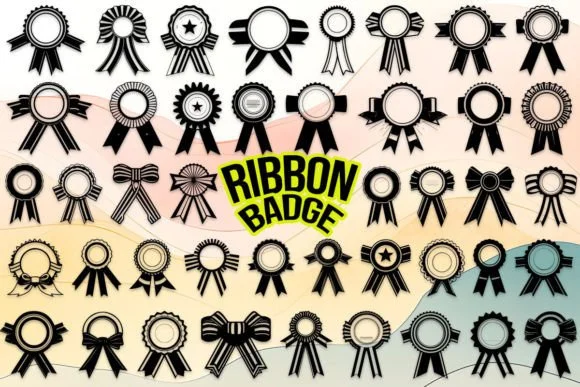
Ribbon Badge by MOMAT THIRTYONE is a dingbat collection built from ribbon and badge shapes, designed to add ornamental touches to layouts without being heavy-handed. With 26 uppercase characters, 26 lowercase variants, and ten numerals, you get enough visual variety to layer into designs without repeating the same element across a page. The shapes carry an illustrative quality that sits comfortably alongside serif or sans-serif text, letting them stand out as intentional flourishes rather than background noise.
This collection shines for product label designs on artisanal goods, where a ribbon badge can frame a product name or highlight key information. Wedding invitation suites often call for decorative accents, and these badges work both as linear elements and as corner flourishes. Custom packaging for small makers benefits from the variety too, letting designers place different ribbon shapes across boxes and tags. Even scrapbooking projects get new life from dingbats that actually feel designed rather than generic or clip-art-adjacent.
Many designers use dingbats primarily for borders and dividers, but these shapes pull double duty as actual focal points in layouts. A single ribbon badge can anchor a label design, while a series of them might border a headline or enclose a testimonial block. The key is that they read as intentional choices rather than decoration for its own sake. Find this collection on Creative Fabrica and start exploring how ribbons and badges can become real design elements rather than mere ornaments.
Style & Use Cases
- Overall Style
- Iconographic, Ribbon
- Use Case
- Icons, Accents
- Ideal For
- ornaments, bullets, and decorative flourishes
- Pairs With
- any text font
How to Install Ribbon Badge Font
Step-by-step instructions for every platform
- 1Download the Ribbon Badge font file (.ttf or .otf).
- 2Locate the downloaded file in your Downloads folder.
- 3Right-click the font file.
- 4Select "Install" to install for the current user, or "Install for all users" to make it available system-wide.
- 5Ribbon Badge is now available in Word, Photoshop, Illustrator, and all other apps.
More by MOMAT THIRTYONE
View all →



Browse fonts by theme
Curated collections →Saw a font in a picture? Identify any font from an image with our free Font Finder.
More Dingbats Fonts
Browse all →







What pairs well with Ribbon Badge Font?
Ribbon Badge Font is a versatile dingbats font that works for both headings and body text. Pair it with a contrasting sans-serif or serif font to add visual interest and a clear distinction between titles and body copy.




Ribbon Badge Font
Reviewed by the FontBoxDL team · Updated July 2026