 Firefox
 1 / 8
1 / 8Loading font…
About Retro Spring Font
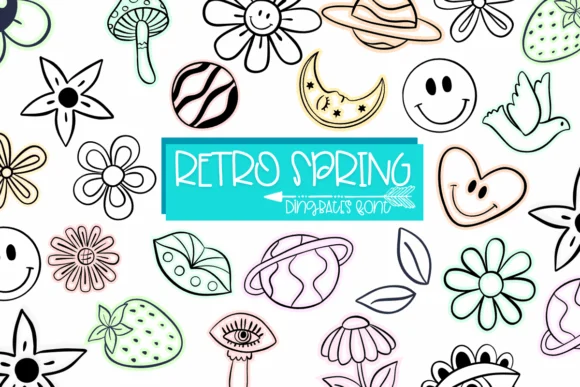
There's something instantly joyful about this collection. Retro Spring by Sirinart is a dingbat font bursting with cheerful symbols that capture the playful spirit of 70s design at its grooviest. Flowers bloom in bold geometric forms, smiley faces radiate pure happiness, and sun symbols scatter throughout, all rendered with that unmistakable psychedelic aesthetic that defined the era. The details stay clean and minimalist, so each glyph remains clear at any size, making it adaptable across scales.
These decorative symbols really shine on retro band posters and vintage concert artwork that channel that psychedelic vibe perfectly. Bohemian wedding invitation suites get an instant character boost from the flower motifs and smiley details. Deploy them as playful accents on botanical skincare packaging or vintage gift tag designs. The geometric precision means they scatter effectively across a social media graphic, layer smoothly into a poster composition, or anchor merchandise design without competing for attention. Even sprinkled as a background pattern, they maintain readability and charm.
Pair Retro Spring with a clean, neutral sans-serif for body text to keep everything readable and grounded. The contrast between groovy symbols and modern typography gives your work genuine balance. Grab it from Creative Fabrica and watch how these vintage symbols transform your retro projects.
Style & Use Cases
- Overall Style
- Iconographic, Abstract
- Use Case
- Icons, Accents
- Ideal For
- ornaments, bullets, and decorative flourishes
- Pairs With
- any text font
How to Install Retro Spring Font
Step-by-step instructions for every platform
- 1Download the Retro Spring font file (.ttf or .otf).
- 2Locate the downloaded file in your Downloads folder.
- 3Right-click the font file.
- 4Select "Install" to install for the current user, or "Install for all users" to make it available system-wide.
- 5Retro Spring is now available in Word, Photoshop, Illustrator, and all other apps.
More by Sirinart
View all →

Browse fonts by theme
Curated collections →Saw a font in a picture? Identify any font from an image with our free Font Finder.
More Dingbats Fonts
Browse all →







What pairs well with Retro Spring Font?
Retro Spring Font is a versatile dingbats font that works for both headings and body text. Pair it with a contrasting sans-serif or serif font to add visual interest and a clear distinction between titles and body copy.




Retro Spring Font
by Sirinart
Reviewed by the FontBoxDL team · Updated October 2026