 Firefox
About RECORDING ARTIST JNL Font
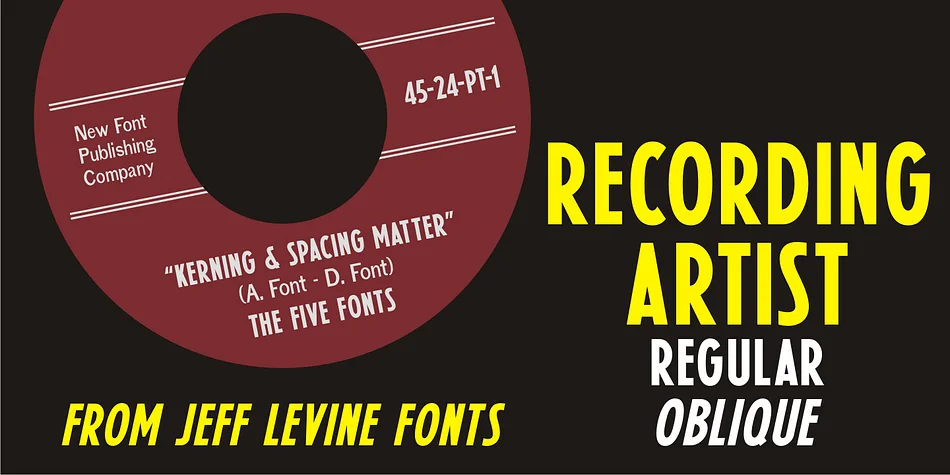
Picture a vinyl sleeve from a classic 1950s record shop, where bold type commands attention on the label. Recording Artist JNL, designed by Jeff Levine Fonts, captures that exact aesthetic: a condensed, heavy-hitting typeface that once defined how record companies announced song titles and credits on 45 RPM discs. The style emerged directly from letterpress practice, when the most direct way to grab attention was to go bold and narrow.
This font excels for projects demanding genuine retro music credibility: vintage vinyl packaging designs, throwback concert poster layouts, independent record store signage, and retro music merchandise graphics. The all-caps character set keeps everything focused and period-appropriate. Each letter's condensed structure means you can pack visual weight into tight spaces without sacrificing clarity, from small label text to oversized display posters.
A companion typeface, Promotional Copy JNL, offers the same record-label aesthetic with lighter weight and expanded character variations. Recording Artist JNL comes in both regular and oblique versions, letting you shift between straight letterpress vibes and dynamic tilted type for layered designs. Pull it from Creative Fabrica and bring that authentic 1950s record-shop character into your work.
Style & Use Cases
- Overall Style
- Eye-catching, Bold
- Use Case
- Headlines, Logos
- Ideal For
- posters, branding, and social media graphics
- Pairs With
- a readable sans or serif for body
How to Install RECORDING ARTIST JNL Font
Step-by-step instructions for every platform
- 1Download the RECORDING ARTIST JNL font file (.ttf or .otf).
- 2Locate the downloaded file in your Downloads folder.
- 3Right-click the font file.
- 4Select "Install" to install for the current user, or "Install for all users" to make it available system-wide.
- 5RECORDING ARTIST JNL is now available in Word, Photoshop, Illustrator, and all other apps.
More by Jeff Levine Fonts
View all →



Browse fonts by theme
Curated collections →Saw a font in a picture? Identify any font from an image with our free Font Finder.
More Display Fonts
Browse all →







What pairs well with RECORDING ARTIST JNL Font?
RECORDING ARTIST JNL Font is a display font that shines as a display or heading face. Pair it with a clean sans-serif or serif font for body text — the contrast creates a clear hierarchy while the two styles stay balanced and easy to read.




RECORDING ARTIST JNL Font
Reviewed by the FontBoxDL team · Updated October 2026