 Firefox
 1 / 5
1 / 5About POPULAR RECORDS JNL Font
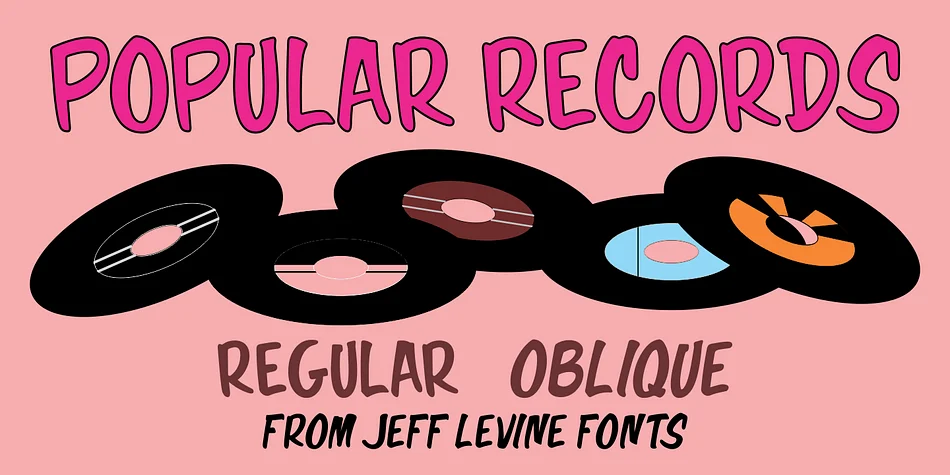
Imagine designing a vintage record store window display or packaging for a reissued soul album from the early 1960s. That's where POPULAR RECORDS JNL, designed by Jeff Levine Fonts, truly comes alive. Inspired by hand-lettered show card advertising spotted in a February 1960 Billboard magazine spread, this display typeface captures the unvarnished warmth and confidence that defined mid-century record label design.
The typeface excels across vinyl record sleeve layouts, retro band merchandise, vintage concert posters, and diner menus seeking authentic 1960s character. The free-form organic letterforms possess real personality. Each character feels genuinely hand-drawn rather than mechanically constructed, with slightly imperfect curves that make viewers instinctively trust the design. It performs beautifully at large display sizes, where every stroke becomes visible and contributes to the overall impression. There's a reason designers still reach for typefaces like this when they want to signal mid-century authenticity without resorting to pastiche or irony.
You get both regular and oblique versions, so you can shift the angle when a design needs forward momentum or emphasis. The regular weight works well across most applications, but don't overlook what the oblique brings to headlines and callouts. Grab it on Creative Fabrica to add this period-perfect gem to your collection.
Style & Use Cases
- Overall Style
- Eye-catching, Bold
- Use Case
- Headlines, Logos
- Ideal For
- posters, branding, and social media graphics
- Pairs With
- a readable sans or serif for body
How to Install POPULAR RECORDS JNL Font
Step-by-step instructions for every platform
- 1Download the POPULAR RECORDS JNL font file (.ttf or .otf).
- 2Locate the downloaded file in your Downloads folder.
- 3Right-click the font file.
- 4Select "Install" to install for the current user, or "Install for all users" to make it available system-wide.
- 5POPULAR RECORDS JNL is now available in Word, Photoshop, Illustrator, and all other apps.
More by Jeff Levine Fonts
View all →



Browse fonts by theme
Curated collections →Saw a font in a picture? Identify any font from an image with our free Font Finder.
More Display Fonts
Browse all →







What pairs well with POPULAR RECORDS JNL Font?
POPULAR RECORDS JNL Font is a display font that shines as a display or heading face. Pair it with a clean sans-serif or serif font for body text — the contrast creates a clear hierarchy while the two styles stay balanced and easy to read.




POPULAR RECORDS JNL Font
Reviewed by the FontBoxDL team · Updated June 2026