 Firefox
 1 / 8
1 / 8About PLAKAT Wood Font
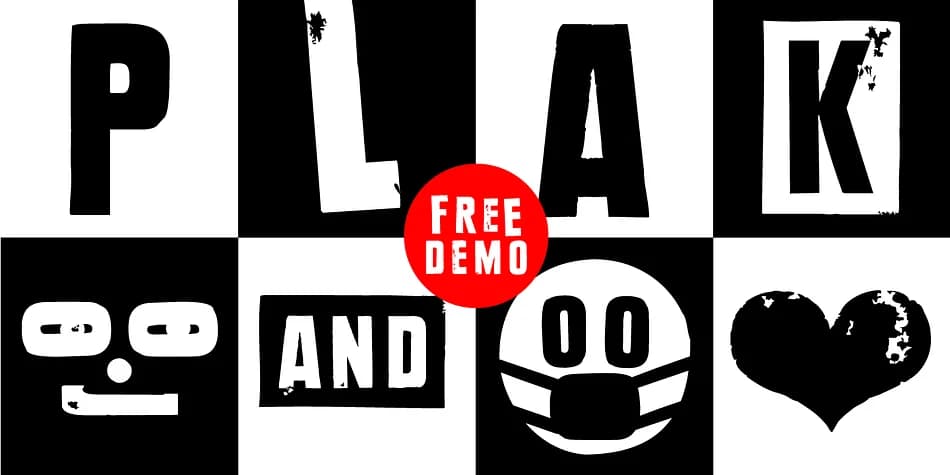
You're laying out a vintage concert poster and need display type that feels hand-crafted but clean enough to print at scale. PLAKAT Wood, designed by Manuel Viergutz in 2021, brings that analog letterpress warmth to digital work. It channels the classic wood letter aesthetic of Paul Renner's Plak Schmalfette, transforming 80 original hand-carved wood letters into a full 640-glyph digital typeface.
The three core styles (Rough, Rough Mix, and Rough Invert) handle different tonal needs, while over 100 built-in decorative elements open up fresh possibilities for every project. You get dingbats, geometric shapes, symbols, and catch words that work as self-contained design elements, plus seven stylistic sets to vary your approach without cycling through multiple files. Type a # shortcut like #LOVE or #SMILE and OpenType features automatically swap in the corresponding symbol in a single keystroke.
The breadth here is worth noting: full Adobe Latin 2 support makes it reliable for multi-lingual headlines, and the dedicated icon style extends its reach beyond traditional typography into complete visual systems. At display sizes, the textured roughness reads as intentional craft rather than gimmick. Grab PLAKAT Wood from Creative Fabrica and let the wood-letter history speak through your next magazine masthead, festival poster, or brand identity project.
Style & Use Cases
- Overall Style
- Iconographic
- Use Case
- Icons, Accents
- Ideal For
- ornaments, bullets, and decorative flourishes
- Pairs With
- any text font
How to Install PLAKAT Wood Font
Step-by-step instructions for every platform
- 1Download the PLAKAT Wood font file (.ttf or .otf).
- 2Locate the downloaded file in your Downloads folder.
- 3Right-click the font file.
- 4Select "Install" to install for the current user, or "Install for all users" to make it available system-wide.
- 5PLAKAT Wood is now available in Word, Photoshop, Illustrator, and all other apps.
More by Typo Graphic Design
View all →
Browse fonts by theme
Curated collections →Saw a font in a picture? Identify any font from an image with our free Font Finder.
More Dingbats Fonts
Browse all →







What pairs well with PLAKAT Wood Font?
PLAKAT Wood Font is a versatile dingbats font that works for both headings and body text. Pair it with a contrasting sans-serif or serif font to add visual interest and a clear distinction between titles and body copy.



PLAKAT Wood Font
Reviewed by the FontBoxDL team · Updated August 2026