 Firefox
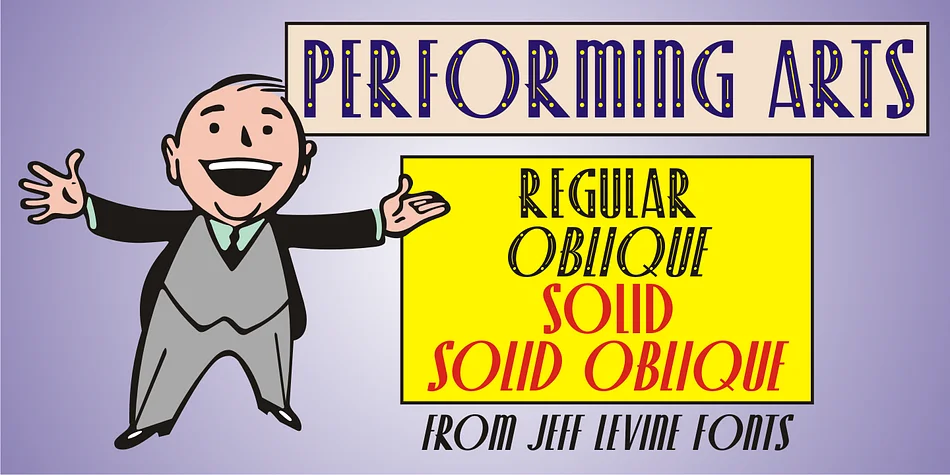
About Performing Arts JNL Font
Performing Arts JNL captures the streamlined glamour of 1930s theatrical design with its geometric precision and ornamental flair. Created by Jeff Levine Fonts, this display typeface springs directly from Art Deco hand lettering that graced the sheet music title of a Fred Astaire-Ginger Rogers film. The ornate version features crisp dots and lines that create visual texture and depth across each letter without overwhelming the forms. A solid version strips away the ornamentation entirely for designers seeking pure, clean geometry.
The typeface comes with four variations to match your project's needs. The dotted ornate style shines on vintage theater posters, speakeasy menu cards, and luxury cosmetics packaging, capturing that nostalgic theatrical energy in every application. The solid versions work equally well for art deco wedding programs and boutique nightclub signage, offering the same period charm with minimalist elegance. You get regular and oblique weights for both styles, so you can match it to your typographic voice.
This typeface thrives in projects where retro authenticity matters. Think vintage record sleeve design, 1930s-inspired restaurant branding, elegant art deco event invitations, and boutique retail packaging. Performing Arts JNL is available on Creative Fabrica for anyone building designs rooted in entertainment's golden age.
Style & Use Cases
- Overall Style
- Eye-catching, Bold
- Use Case
- Headlines, Logos
- Ideal For
- posters, branding, and social media graphics
- Pairs With
- a readable sans or serif for body
How to Install Performing Arts JNL Font
Step-by-step instructions for every platform
- 1Download the Performing Arts JNL font file (.ttf or .otf).
- 2Locate the downloaded file in your Downloads folder.
- 3Right-click the font file.
- 4Select "Install" to install for the current user, or "Install for all users" to make it available system-wide.
- 5Performing Arts JNL is now available in Word, Photoshop, Illustrator, and all other apps.
More by Jeff Levine Fonts
View all →



Browse fonts by theme
Curated collections →Saw a font in a picture? Identify any font from an image with our free Font Finder.
More Display Fonts
Browse all →







What pairs well with Performing Arts JNL Font?
Performing Arts JNL Font is a display font that shines as a display or heading face. Pair it with a clean sans-serif or serif font for body text — the contrast creates a clear hierarchy while the two styles stay balanced and easy to read.




Performing Arts JNL Font
Reviewed by the FontBoxDL team · Updated September 2026