 Firefox
 1 / 7
1 / 7About Novecento Sans Font
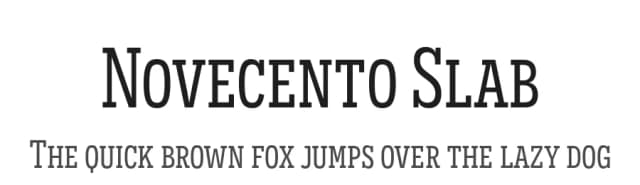
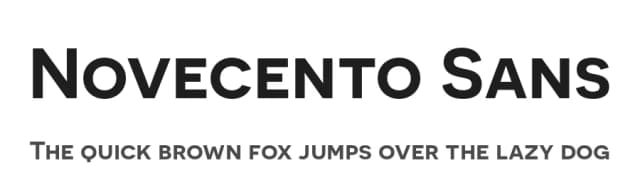
Geometric lines meet nostalgic character in this uppercase-only typeface. Novecento Sans by Synthview Type Design draws inspiration from early 20th-century European design, capturing that era's rational beauty while remaining relevant to contemporary work.
This typeface strikes a balance between strict geometry and optical refinement, making it versatile across a range of applications. You'll find it works beautifully for vintage brand logos, art deco posters, luxury fashion headers, and upscale packaging designs. The lighter weights deliver a more contemporary, polished feeling, whereas the bolder cuts drift firmly into retro territory. With 32 styles spanning the weight spectrum, 76 supported languages, and 590 glyphs, there's genuine flexibility here. The typeface includes 16 OpenType features, which opens doors for advanced typography work and stylistic exploration. You can also layer Novecento Carved on top if you want a carved or textured effect, creating dimensional display treatments.
Since Novecento Sans thrives as a display font, pairing it with a clean serif or understated sans-serif for body text will keep your hierarchy clear and your designs readable. The contrast lets the display weight do what it does best: command attention. Find Novecento Sans on Creative Fabrica.
Style & Use Cases
- Overall Style
- Eye-catching, Bold
- Use Case
- Headlines, Logos
- Ideal For
- posters, branding, and social media graphics
- Pairs With
- a readable sans or serif for body
How to Install Novecento Sans Font
Step-by-step instructions for every platform
- 1Download the Novecento Sans font file (.ttf or .otf).
- 2Locate the downloaded file in your Downloads folder.
- 3Right-click the font file.
- 4Select "Install" to install for the current user, or "Install for all users" to make it available system-wide.
- 5Novecento Sans is now available in Word, Photoshop, Illustrator, and all other apps.
More by Synthview Type Design
View all →

Browse fonts by theme
Curated collections →Saw a font in a picture? Identify any font from an image with our free Font Finder.
More Display Fonts
Browse all →







What pairs well with Novecento Sans Font?
Novecento Sans Font is a display font that shines as a display or heading face. Pair it with a clean sans-serif or serif font for body text — the contrast creates a clear hierarchy while the two styles stay balanced and easy to read.



Novecento Sans Font
Reviewed by the FontBoxDL team · Updated September 2026