 Firefox
 1 / 3
1 / 3About Nostalgic Feather Font
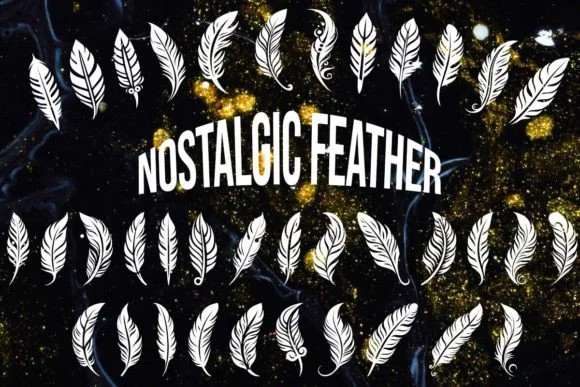
There's something about feathered flourishes that instantly evokes nostalgia and handmade charm. Nostalgic Feather, designed by MOMAT THIRTYONE, is a comprehensive dingbat collection built around intricate feather and butterfly motifs. The symbols feel genuinely hand-drawn, making them ideal for wedding stationery borders, embroidered gift tags, scrapbooking layouts, and monogram designs where you need small, refined decorative marks that can stand alone or frame text beautifully.
What sets this collection apart is the depth of the character set and versatility it brings to different mediums. You get ornamental alphabets alongside numerical symbols and numerous feather variations, giving you creative flexibility whether you're working on digital designs or preparing files for print. The linework is delicate but readable, even at smaller sizes. Hand-lettering greeting cards, creating custom packaging labels for small businesses, designing bookplates for a personal library, or building scrapbook borders all become easier when you have this range of standalone marks that work as accents, dividers, or corner flourishes without overwhelming your composition.
Pair Nostalgic Feather with a clean, no-nonsense serif when you need headings, or choose a minimal sans-serif for body text to keep the balance between ornament and readability. You can grab it from Creative Fabrica and start layering these nostalgic touches into your designs right away.
Style & Use Cases
- Overall Style
- Iconographic, Dingbats Fonts
- Use Case
- Icons, Accents
- Ideal For
- ornaments, bullets, and decorative flourishes
- Pairs With
- any text font
How to Install Nostalgic Feather Font
Step-by-step instructions for every platform
- 1Download the Nostalgic Feather font file (.ttf or .otf).
- 2Locate the downloaded file in your Downloads folder.
- 3Right-click the font file.
- 4Select "Install" to install for the current user, or "Install for all users" to make it available system-wide.
- 5Nostalgic Feather is now available in Word, Photoshop, Illustrator, and all other apps.
More by MOMAT THIRTYONE
View all →



Browse fonts by theme
Curated collections →Saw a font in a picture? Identify any font from an image with our free Font Finder.
More Dingbats Fonts
Browse all →







What pairs well with Nostalgic Feather Font?
Nostalgic Feather Font is a versatile dingbats font that works for both headings and body text. Pair it with a contrasting sans-serif or serif font to add visual interest and a clear distinction between titles and body copy.




Nostalgic Feather Font
Reviewed by the FontBoxDL team · Updated July 2026