 Firefox
 1 / 6
1 / 6About Nono Font
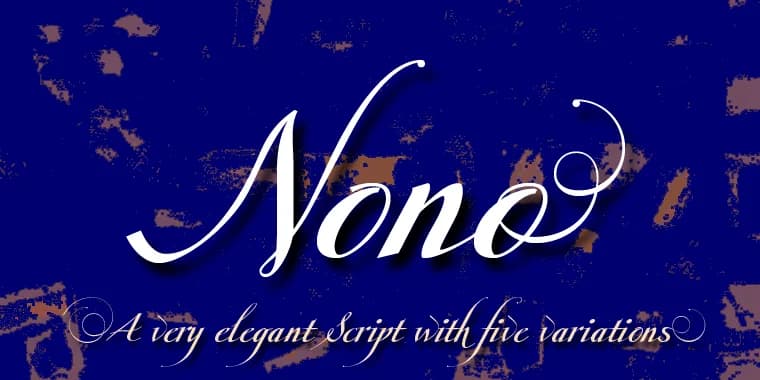
There's something genuinely warm about a font born from a child's innocent mispronunciation. Nono by Wiescher-Design began as a hand-lettered script capturing the designer's son's spirit, then matured into a more refined, contemporary typeface that somehow kept all that original personality intact. The package here is generous: three distinct character sets plus a small caps version, rounded out with bonus endletters that expand your compositional options. You can mix and layer these elements freely, building custom arrangements that would be tedious to create another way.
The real value shows itself in decorative contexts where character counts more than uniformity. Hand-lettered wedding invitation headers gain instant authenticity with this typeface, while greeting card embellishments benefit from its modern-meets-handmade balance. Scrapbooking layouts find it useful for bridging formal and playful moods, and craft labels that need genuine personality instead of generic decoration respond beautifully to Nono's voice. The multiple character sets mean flexibility instead of creative constraint, something rare in the dingbat category. Pair it alongside a clean, neutral sans-serif for any layouts mixing display and body text, or let Nono carry the full visual weight on its own.
Find Nono on Creative Fabrica and discover a typeface that proves playfulness and refinement aren't opposing forces.
Style & Use Cases
- Overall Style
- Iconographic
- Use Case
- Icons, Accents
- Ideal For
- ornaments, bullets, and decorative flourishes
- Pairs With
- any text font
How to Install Nono Font
Step-by-step instructions for every platform
- 1Download the Nono font file (.ttf or .otf).
- 2Locate the downloaded file in your Downloads folder.
- 3Right-click the font file.
- 4Select "Install" to install for the current user, or "Install for all users" to make it available system-wide.
- 5Nono is now available in Word, Photoshop, Illustrator, and all other apps.
More by Wiescher-Design
View all →
Browse fonts by theme
Curated collections →Saw a font in a picture? Identify any font from an image with our free Font Finder.
More Dingbats Fonts
Browse all →







What pairs well with Nono Font?
Nono Font is a versatile dingbats font that works for both headings and body text. Pair it with a contrasting sans-serif or serif font to add visual interest and a clear distinction between titles and body copy.



Nono Font
Reviewed by the FontBoxDL team · Updated August 2026