 Firefox
 1 / 5
1 / 5About My Donut's Font
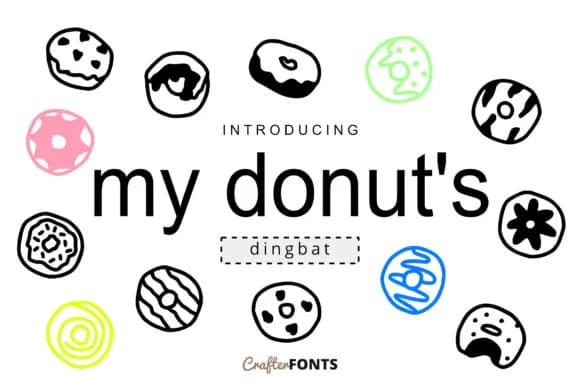
Playful and decidedly sugary, My Donut's from CrafterFonts is a dingbat font that brings charming, hand-drawn donut illustrations and sweet icon symbols straight into your designs. With 62 unique glyphs ranging from glazed donuts and frosting swirls to colorful toppings and sprinkles, you'll have plenty of decorative elements to work with without needing to hunt down additional graphic packs.
For bakery owners and dessert-focused businesses, this font shines on menu cards and signage where you want to add visual personality and warmth without relying on photography. Use it to accent donut shop packaging labels, adding that artisanal touch that makes customers smile when they see your branding. Kids' birthday invitation designs benefit from its hand-drawn character, and craft label makers can use it for labeling homemade treats, gift tags, or baked goods packaging. Dessert bloggers and food photographers often scatter these symbols across recipe card graphics or social media posts to reinforce their sweet brand identity and make visual content pop.
Pair My Donut's with a clean, modern sans-serif for any body text or longer copy, and you'll have a complete system for cohesive branding across all your materials. It's a natural fit for anyone building a sweet-themed visual identity, and you can find it on Creative Fabrica ready to use.
Style & Use Cases
- Overall Style
- Iconographic, Doodle
- Use Case
- Icons, Accents
- Ideal For
- ornaments, bullets, and decorative flourishes
- Pairs With
- any text font
How to Install My Donut's Font
Step-by-step instructions for every platform
- 1Download the My Donut's font file (.ttf or .otf).
- 2Locate the downloaded file in your Downloads folder.
- 3Right-click the font file.
- 4Select "Install" to install for the current user, or "Install for all users" to make it available system-wide.
- 5My Donut's is now available in Word, Photoshop, Illustrator, and all other apps.
More by CrafterFonts
View all →
Browse fonts by theme
Curated collections →Saw a font in a picture? Identify any font from an image with our free Font Finder.
More Dingbats Fonts
Browse all →







What pairs well with My Donut's Font?
My Donut's Font is a versatile dingbats font that works for both headings and body text. Pair it with a contrasting sans-serif or serif font to add visual interest and a clear distinction between titles and body copy.



My Donut's Font
by CrafterFonts
Reviewed by the FontBoxDL team · Updated July 2026