 Firefox
 1 / 5
1 / 5About MUNICIPAL POOL JNL Font
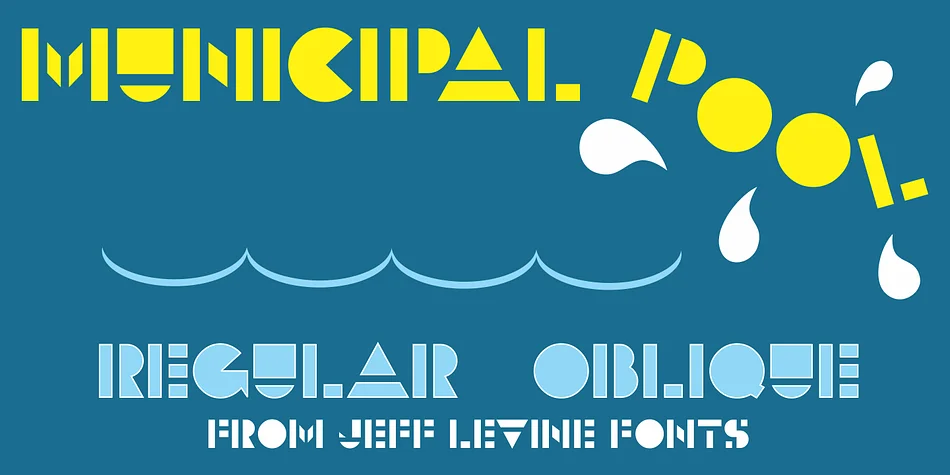
Geometric stencil-like letterforms define this typeface, which Jeff Levine Fonts adapted from mid-century architectural signage. MUNICIPAL POOL JNL draws from the bold lettering that once graced a Boise swimming facility's entrance, translating that industrial clarity into a display face for anyone seeking authentic retro character. The construction is straightforward and sharp, with no wasted motion in the forms.
When you need designs rooted in 1950s functional aesthetics, this font steps up. Vintage diner menus, record store poster artwork, craft brewery and distillery labels, and retro motel signage all benefit from the typeface's no-nonsense geometry and midcentury character. The stencil-like construction keeps letters readable across a wide range of sizes, and the weight distribution works equally well as a headline or secondary element. Each letterform carries structural clarity that reads fast and holds attention.
Both regular and oblique versions give you flexibility for emphasis and visual flow without requiring a second font family. Graphic designers, brand strategists, and anyone building vintage-tinged work will recognize MUNICIPAL POOL JNL as purpose-built for this aesthetic. Find it on Creative Fabrica and start bringing that clean, period-authentic edge into your projects.
Style & Use Cases
- Overall Style
- Eye-catching, Bold
- Use Case
- Headlines, Logos
- Ideal For
- posters, branding, and social media graphics
- Pairs With
- a readable sans or serif for body
How to Install MUNICIPAL POOL JNL Font
Step-by-step instructions for every platform
- 1Download the MUNICIPAL POOL JNL font file (.ttf or .otf).
- 2Locate the downloaded file in your Downloads folder.
- 3Right-click the font file.
- 4Select "Install" to install for the current user, or "Install for all users" to make it available system-wide.
- 5MUNICIPAL POOL JNL is now available in Word, Photoshop, Illustrator, and all other apps.
More by Jeff Levine Fonts
View all →



Browse fonts by theme
Curated collections →Saw a font in a picture? Identify any font from an image with our free Font Finder.
More Display Fonts
Browse all →







What pairs well with MUNICIPAL POOL JNL Font?
MUNICIPAL POOL JNL Font is a display font that shines as a display or heading face. Pair it with a clean sans-serif or serif font for body text — the contrast creates a clear hierarchy while the two styles stay balanced and easy to read.




MUNICIPAL POOL JNL Font
Reviewed by the FontBoxDL team · Updated September 2026