 Firefox
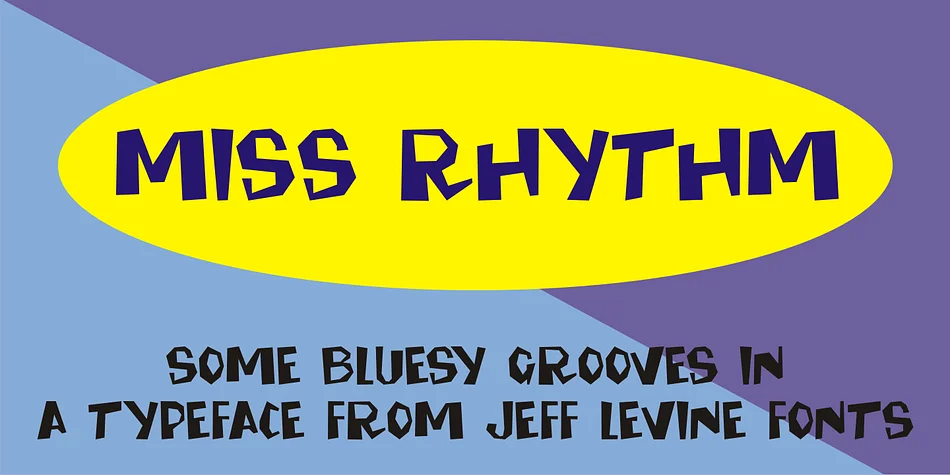
About MISS RHYTHM JNL Font
This is a font that practically swings with energy and vintage soul. MISS RHYTHM JNL, designed by Jeff Levine Fonts, captures the hand-lettered charm of 1960s music industry advertising, drawing directly from the promotional materials that announced Ruth Brown's most iconic releases. Ruth Brown earned the nickname "Miss Rhythm" for her uptempo jump tunes that blended rhythm and blues with infectious energy, and this typeface channels that same spirited character in every letterform.
Vinyl record labels, vintage-style concert posters for music events, 1960s-themed wedding invitations with playful energy, mid-century diner signage, and Etsy product packaging with nostalgic flair all come alive in this typeface's distinctive curves and bouncy letterforms. Its personality emerges from the era when type was drawn by hand rather than generated, giving it that tactile, slightly imperfect appeal that contemporary audiences find so compelling. Instead of grid-based coldness, every letterform radiates warmth. Watch how it comes alive the moment you use it.
Pair MISS RHYTHM JNL with a clean, understated sans-serif when you need readable body text or supporting copy, letting the display font take center stage for headlines and branding. Creative Fabrica has it ready to download, so bring some authentic vintage rhythm and soul into your next design.
Style & Use Cases
- Overall Style
- Eye-catching, Bold
- Use Case
- Headlines, Logos
- Ideal For
- posters, branding, and social media graphics
- Pairs With
- a readable sans or serif for body
How to Install MISS RHYTHM JNL Font
Step-by-step instructions for every platform
- 1Download the MISS RHYTHM JNL font file (.ttf or .otf).
- 2Locate the downloaded file in your Downloads folder.
- 3Right-click the font file.
- 4Select "Install" to install for the current user, or "Install for all users" to make it available system-wide.
- 5MISS RHYTHM JNL is now available in Word, Photoshop, Illustrator, and all other apps.
More by Jeff Levine Fonts
View all →



Browse fonts by theme
Curated collections →Saw a font in a picture? Identify any font from an image with our free Font Finder.
More Display Fonts
Browse all →







What pairs well with MISS RHYTHM JNL Font?
MISS RHYTHM JNL Font is a display font that shines as a display or heading face. Pair it with a clean sans-serif or serif font for body text — the contrast creates a clear hierarchy while the two styles stay balanced and easy to read.




MISS RHYTHM JNL Font
Reviewed by the FontBoxDL team · Updated September 2026