 Firefox
 1 / 10
About Les Tulipes Pro Font
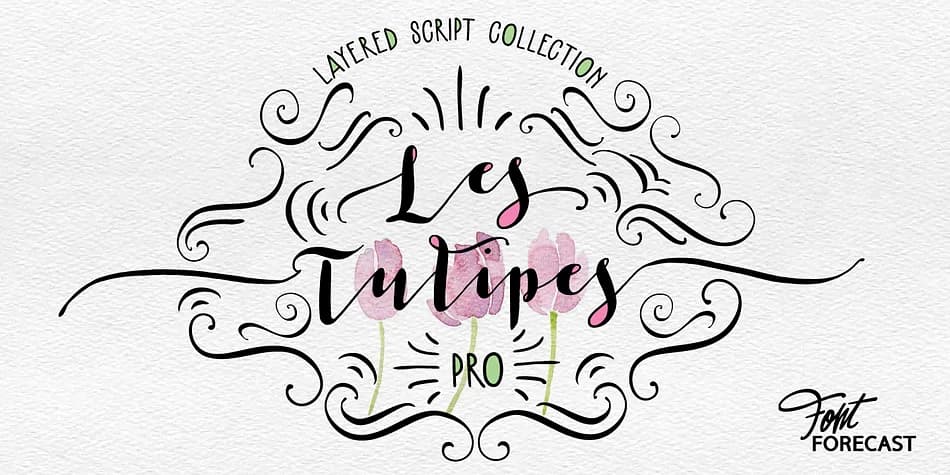
Letterforms that flow with genuine pen strokes and hand-drawn elegance, Les Tulipes Pro by Fontforecast is a layered calligraphy system designed to feel like continuous ink from nib to paper. Each character carries elongated entrance and exit strokes (accessed via keyboard modifiers ++1 through ++10 and __1 through __10) that create natural rhythm and movement across a line. The typeface family includes five different connector spaces, nine alternate ampersands, and two @ sign variations, all designed to work together without feeling forced or artificial.
Beyond the core design, Les Tulipes Pro offers multiple companions that extend its range. The Sans versions provide straighter letterforms to balance flowing calligraphy passages, while Bold and Closed cuts add emphasis and geometric contrast. Five stylistic sets let you swap alternate characters throughout your work, and when discretionary ligatures are enabled, the font reveals additional polish. For designers wanting maximum embellishment, Les Tulipes Pro Extra delivers 85 swirls and ornamental flourishes ready to layer over text.
This font family shines on wedding invitation suites, custom stationery packages, boutique product labels, and hand-lettered signage where personality matters more than neutral legibility. It suits anyone building premium branding that needs sophisticated movement without computer-generated stiffness. Find Les Tulipes Pro on Creative Fabrica.
Style & Use Cases
- Overall Style
- Iconographic
- Use Case
- Icons, Accents
- Ideal For
- ornaments, bullets, and decorative flourishes
- Pairs With
- any text font
How to Install Les Tulipes Pro Font
Step-by-step instructions for every platform
- 1Download the Les Tulipes Pro font file (.ttf or .otf).
- 2Locate the downloaded file in your Downloads folder.
- 3Right-click the font file.
- 4Select "Install" to install for the current user, or "Install for all users" to make it available system-wide.
- 5Les Tulipes Pro is now available in Word, Photoshop, Illustrator, and all other apps.
More by Fontforecast
View all →


Browse fonts by theme
Curated collections →Saw a font in a picture? Identify any font from an image with our free Font Finder.
More Dingbats Fonts
Browse all →







What pairs well with Les Tulipes Pro Font?
Les Tulipes Pro Font is a versatile dingbats font that works for both headings and body text. Pair it with a contrasting sans-serif or serif font to add visual interest and a clear distinction between titles and body copy.



Les Tulipes Pro Font
by Fontforecast
Reviewed by the FontBoxDL team · Updated August 2026