 Firefox
 1 / 10
About Kinfolk Pro Font
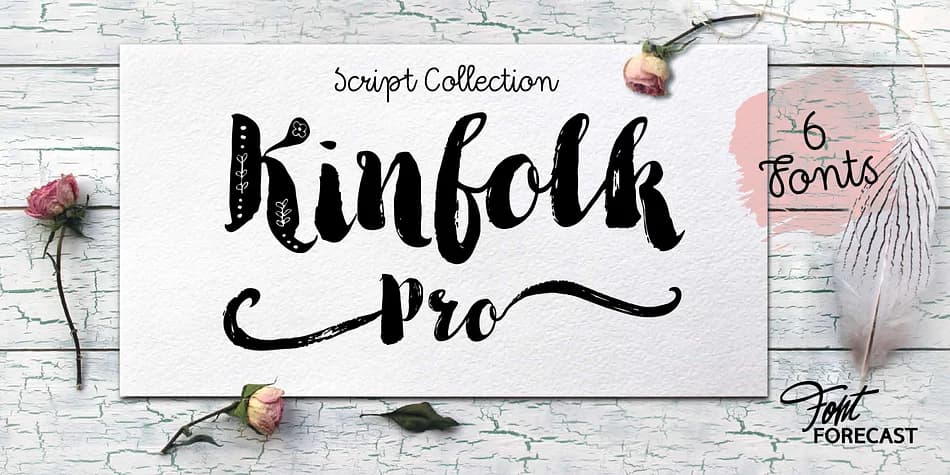
Kinfolk Pro is a six-font collection from Fontforecast that pairs sturdy, bold brush letterforms with precise technical control. The Rough variant captures the authentic texture of a slightly dried-out brush, while the Smooth version refines those strokes into clean, crisp contours. Both styles contain 606 glyphs and four ornamented capital alternates in stylistic sets.
The real power comes from the contextual features. With Discretionary Ligatures and Contextual Alternates enabled, you can trigger elongated swashes by typing modifier characters before and after letters, or access standalone swashes through your glyphs panel. Kinfolk Pro Script offers a fully connected script that pairs beautifully with both brush styles, while the Ornaments font layers in additional swashes, ink blobs, and gestural marks. Two bonus fonts (Arrows and Flowers) each contain 230 glyphs for decorative detail work.
This family shines for hand-lettered wedding invitations, indie product labels, boutique packaging design, and custom social media graphics where authentic brush texture matters. Since the fonts rely on advanced OpenType features, you'll want to work in an application that fully supports those specifications (think design software rather than basic text editors). Get it on Creative Fabrica to start exploring these expressive brush variations.
Style & Use Cases
- Overall Style
- Elegant, Flowing
- Use Case
- Invitations, Branding
- Ideal For
- wedding stationery, greeting cards, and signatures
- Pairs With
- a simple uppercase sans
How to Install Kinfolk Pro Font
Step-by-step instructions for every platform
- 1Download the Kinfolk Pro font file (.ttf or .otf).
- 2Locate the downloaded file in your Downloads folder.
- 3Right-click the font file.
- 4Select "Install" to install for the current user, or "Install for all users" to make it available system-wide.
- 5Kinfolk Pro is now available in Word, Photoshop, Illustrator, and all other apps.
More by Fontforecast
View all →

Browse fonts by theme
Curated collections →Saw a font in a picture? Identify any font from an image with our free Font Finder.
More Script Handwritten Fonts
Browse all →







What pairs well with Kinfolk Pro Font?
Kinfolk Pro Font is a script font that shines as a display or heading face. Pair it with a clean sans-serif or serif font for body text — the contrast creates a clear hierarchy while the two styles stay balanced and easy to read.



Kinfolk Pro Font
by Fontforecast
Reviewed by the FontBoxDL team · Updated July 2026