 Firefox
 1 / 9
1 / 9About LED pixel Font
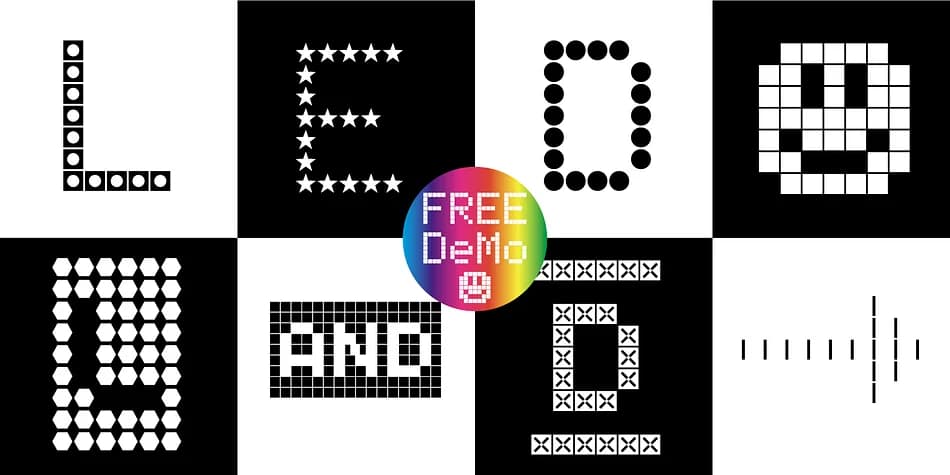
Geometric precision meets playful digitalism in this modular display system. LED pixel, created by Manuel Viergutz for Typo Graphic Design, reimagines typography as a grid of building blocks where every element snaps together in countless configurations.
The family includes 60 different style variations (Circle, Hex, Square, Star, and more) plus 903 total glyphs with full Adobe Latin 3 support. Beyond standard letters, you get 300+ decorative extras: arrows, dingbats, symbols, geometric shapes, and dynamic ligatures that activate through OpenType features (type #LOVE for a heart, #SMILE for a grin). Six stylistic sets add another layer of flexibility, letting you tweak the visual character of each application without switching font files.
Use it for tech startup logos, interactive digital product headers, retro gaming UI design, and neon sign mockup projects. Display sizes showcase this typeface best, and it works in both print format (.otf for Mac and Windows) and as a web font (.woff), so your design stays consistent across platforms. Pair it with a neutral sans-serif for any body text that needs readability, then let the grid structure carry the visual weight. Grab LED pixel on Creative Fabrica and start building designs with a typeface that turns constraints into creative opportunities.
Style & Use Cases
- Overall Style
- Iconographic
- Use Case
- Icons, Accents
- Ideal For
- ornaments, bullets, and decorative flourishes
- Pairs With
- any text font
How to Install LED pixel Font
Step-by-step instructions for every platform
- 1Download the LED pixel font file (.ttf or .otf).
- 2Locate the downloaded file in your Downloads folder.
- 3Right-click the font file.
- 4Select "Install" to install for the current user, or "Install for all users" to make it available system-wide.
- 5LED pixel is now available in Word, Photoshop, Illustrator, and all other apps.
More by Typo Graphic Design
View all →
Browse fonts by theme
Curated collections →Saw a font in a picture? Identify any font from an image with our free Font Finder.
More Dingbats Fonts
Browse all →







What pairs well with LED pixel Font?
LED pixel Font is a versatile dingbats font that works for both headings and body text. Pair it with a contrasting sans-serif or serif font to add visual interest and a clear distinction between titles and body copy.



LED pixel Font
Reviewed by the FontBoxDL team · Updated August 2026