 Firefox
 1 / 3
1 / 3About Leaves with Flower Font
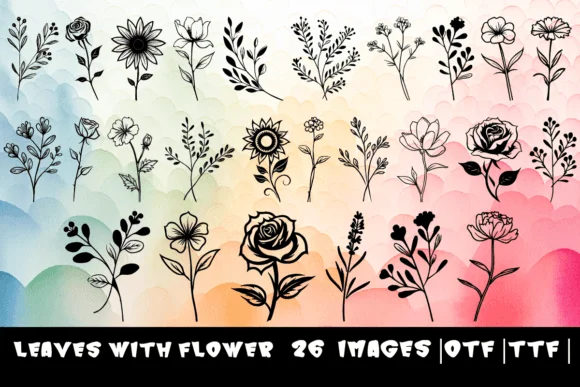
There's something instantly soothing about these botanical forms, a quietness that comes from nature itself. Leaves with Flower is a dingbat set by designer MOMAT THIRTYONE, where every character from A to Z gets reimagined as an ornamental element sprouting foliage and delicate blooms. The 26 letterforms feel hand-drawn even in their digital form, with intricate detailing throughout that rewards closer inspection and adds visual depth to any layout.
This set excels for multiple creative applications. Wedding invitation suites gain an elegant botanical touch immediately, while artisanal skincare and cosmetic brands rely on these letterforms for product packaging and labels to signal authentic, handmade quality. Botanical journal covers and nature-themed wall art installations also benefit tremendously from the organic character these forms bring to a design. Both OTF and TTF file formats are included in the package, ensuring broad compatibility across Adobe Creative Suite, Affinity software, and most other design platforms you might use in your workflow.
Pair these decorative letterforms with a minimal sans-serif for body text, which keeps the floral characters as the focal point without competing for attention or visual clarity. Creative Fabrica has the full set available now, ready to bring that natural, artistic quality into your next creative project.
Style & Use Cases
- Overall Style
- Iconographic, Leaves
- Use Case
- Icons, Accents
- Ideal For
- ornaments, bullets, and decorative flourishes
- Pairs With
- any text font
How to Install Leaves with Flower Font
Step-by-step instructions for every platform
- 1Download the Leaves with Flower font file (.ttf or .otf).
- 2Locate the downloaded file in your Downloads folder.
- 3Right-click the font file.
- 4Select "Install" to install for the current user, or "Install for all users" to make it available system-wide.
- 5Leaves with Flower is now available in Word, Photoshop, Illustrator, and all other apps.
More by MOMAT THIRTYONE
View all →



Browse fonts by theme
Curated collections →Saw a font in a picture? Identify any font from an image with our free Font Finder.
More Dingbats Fonts
Browse all →







What pairs well with Leaves with Flower Font?
Leaves with Flower Font is a versatile dingbats font that works for both headings and body text. Pair it with a contrasting sans-serif or serif font to add visual interest and a clear distinction between titles and body copy.




Leaves with Flower Font
Reviewed by the FontBoxDL team · Updated June 2026