 Firefox
 1 / 6
1 / 6About Leaves of Memories Font
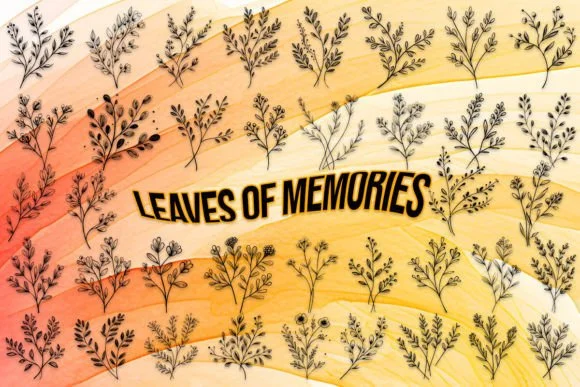
This dingbat set holds the quiet beauty of leaves pressed into memory. Leaves of Memories, designed by MOMAT THIRTYONE, translates botanical forms into 62 thoughtful characters (26 uppercase, 26 lowercase, and the complete digit set 0-9). Each symbol has been crafted with the kind of deliberation you feel when handling actual pressed foliage, and that restraint is what makes the font work across so many applications without feeling forced or overly sentimental.
The real strength here is versatility. Use the set for wedding invitation embellishments where subtle greenery strengthens the overall impression, or layer it into botanical journal covers and scrapbooking layouts where handmade quality matters. They work equally well as Etsy product watermarks and packaging accents for herbal goods, and they're natural fits for woodland-themed nursery prints and hand-lettered menus. When you need ornamental elements that feel organic rather than graphic-heavy, these leaf forms do the job without dominating the page.
Pair this dingbat collection with a clean serif or minimal sans-serif when you need readable body text to sit alongside it. Pick up Leaves of Memories on Creative Fabrica and start bringing it into your projects.
Style & Use Cases
- Overall Style
- Iconographic, Leaves
- Use Case
- Icons, Accents
- Ideal For
- ornaments, bullets, and decorative flourishes
- Pairs With
- any text font
How to Install Leaves of Memories Font
Step-by-step instructions for every platform
- 1Download the Leaves of Memories font file (.ttf or .otf).
- 2Locate the downloaded file in your Downloads folder.
- 3Right-click the font file.
- 4Select "Install" to install for the current user, or "Install for all users" to make it available system-wide.
- 5Leaves of Memories is now available in Word, Photoshop, Illustrator, and all other apps.
More by MOMAT THIRTYONE
View all →



Browse fonts by theme
Curated collections →Saw a font in a picture? Identify any font from an image with our free Font Finder.
More Dingbats Fonts
Browse all →







What pairs well with Leaves of Memories Font?
Leaves of Memories Font is a versatile dingbats font that works for both headings and body text. Pair it with a contrasting sans-serif or serif font to add visual interest and a clear distinction between titles and body copy.




Leaves of Memories Font
Reviewed by the FontBoxDL team · Updated July 2026