 Firefox
 1 / 5
1 / 5About Leaves Font
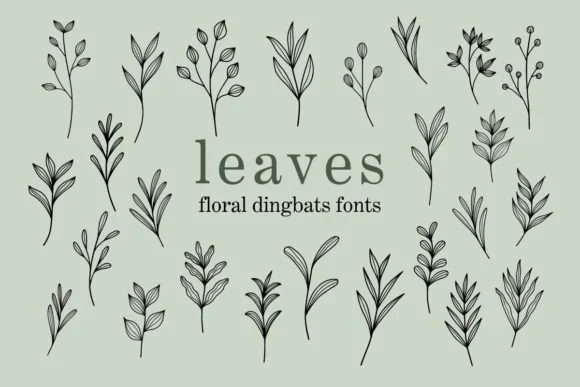
This typeface feels playful and natural, with sparkling accents that suggest handmade elegance rather than computer-generated perfection. Leaves, designed by Eystore, is a dingbat collection built entirely around botanical shapes and decorative flourishes, working beautifully across multiple seasons and design contexts.
The real strength here is its specificity and versatility. Use it for Halloween invitation suites and spooky treat labels, Christmas card designs with illustrated ornaments, Valentine's Day stationery and romantic gift tags, or Thanksgiving table settings and recipe card illustrations. Beyond those seasonal occasions, you'll find it working equally well in boutique botanical skincare packaging, Etsy shop graphics and product display imagery, DIY craft labels and handmade sticker designs, and informal event invitations that need character and warmth. The collection arrives in both OTF and SVG formats, which means you can integrate it into standard design software or prepare artwork for cutting machines without complications.
Pair Leaves with a quiet, contemporary sans-serif typeface to keep visual focus on the decorative elements, or combine it with a refined serif when designing formal seasonal stationery. Head to Creative Fabrica to add this botanical collection to your toolkit and bring organic elegance to your next project.
Style & Use Cases
- Overall Style
- Iconographic, Hellowen Font
- Use Case
- Icons, Accents
- Ideal For
- ornaments, bullets, and decorative flourishes
- Pairs With
- any text font
How to Install Leaves Font
Step-by-step instructions for every platform
- 1Download the Leaves font file (.ttf or .otf).
- 2Locate the downloaded file in your Downloads folder.
- 3Right-click the font file.
- 4Select "Install" to install for the current user, or "Install for all users" to make it available system-wide.
- 5Leaves is now available in Word, Photoshop, Illustrator, and all other apps.
More by Eystore
View all →
Browse fonts by theme
Curated collections →Saw a font in a picture? Identify any font from an image with our free Font Finder.
More Dingbats Fonts
Browse all →







What pairs well with Leaves Font?
Leaves Font is a versatile dingbats font that works for both headings and body text. Pair it with a contrasting sans-serif or serif font to add visual interest and a clear distinction between titles and body copy.




Leaves Font
by Eystore
Reviewed by the FontBoxDL team · Updated July 2026