 Firefox
 1 / 8
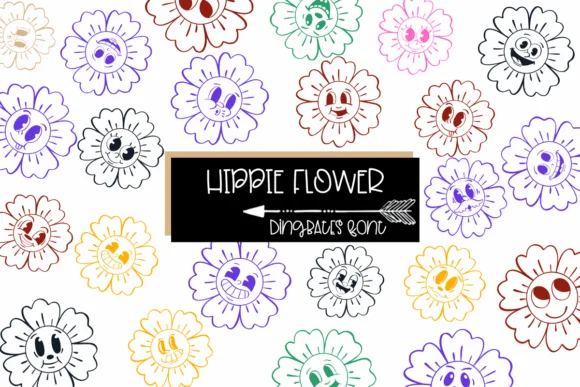
1 / 8About Hippie Flower Font
This font radiates warmth and cheerful whimsy. Hippie Flower, designed by Sirinart, brings genuine groovy 70s spirit through its collection of smiling, playful flower dingbats rendered with authentic retro charm and personality.
Use this font for projects where that vintage aesthetic matters most. Retro wedding invitation suites with nostalgic boho flair, scrapbooking layouts that capture the analog era, vintage concert poster designs for music lovers, groovy album artwork celebrating retro aesthetics, or DIY craft signage with that unmistakable hand-drawn vibe all benefit from Hippie Flower's character and warmth. Each flower carries that organic, hand-crafted quality that reads as intentional and considered rather than generic decoration. Available in both OTF and TTF formats, the font integrates smoothly across Procreate, Affinity Designer, Affinity Photo, and your other creative tools. Works especially well when layered with abstract illustration or used for coloring and outline applications that let the details shine through.
Pair Hippie Flower with a clean, contemporary sans-serif for body text or supporting elements. That contrast lets the flower characters serve as focal points without overwhelming the composition. Find this groovy dingbat font on Creative Fabrica and bring authentic 70s warmth to your next design project.
Style & Use Cases
- Overall Style
- Iconographic, Hippie Flower
- Use Case
- Icons, Accents
- Ideal For
- ornaments, bullets, and decorative flourishes
- Pairs With
- any text font
How to Install Hippie Flower Font
Step-by-step instructions for every platform
- 1Download the Hippie Flower font file (.ttf or .otf).
- 2Locate the downloaded file in your Downloads folder.
- 3Right-click the font file.
- 4Select "Install" to install for the current user, or "Install for all users" to make it available system-wide.
- 5Hippie Flower is now available in Word, Photoshop, Illustrator, and all other apps.
More by Sirinart
View all →

Browse fonts by theme
Curated collections →Saw a font in a picture? Identify any font from an image with our free Font Finder.
More Dingbats Fonts
Browse all →







What pairs well with Hippie Flower Font?
Hippie Flower Font is a versatile dingbats font that works for both headings and body text. Pair it with a contrasting sans-serif or serif font to add visual interest and a clear distinction between titles and body copy.




Hippie Flower Font
by Sirinart
Reviewed by the FontBoxDL team · Updated July 2026