 Firefox

 1 / 5
Loading font…
About Henoki Font
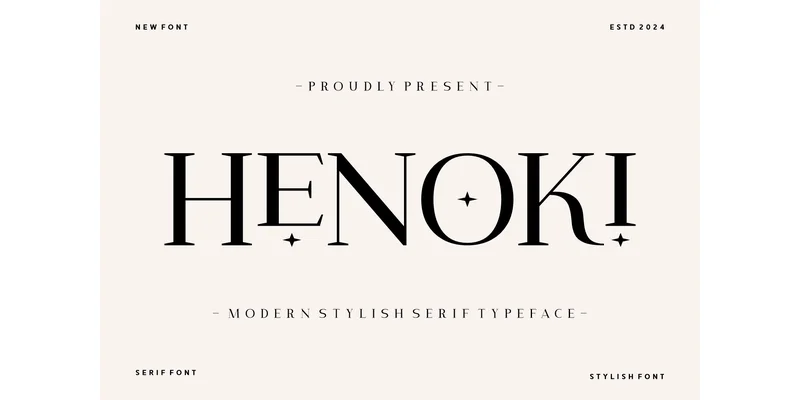
Henoki is a serif typeface by Creative Fabrica Fonts that builds from classical proportions but updates them for contemporary work. The letterforms feature measured stroke contrast and serifs that balance visual weight across all character sizes. This quality makes the typeface work equally well when set small for body text or enlarged for headlines, without changing how it feels.
Wedding invitation suites, high-end product packaging, gallery exhibition catalogs, and upscale restaurant menus all benefit from Henoki's particular kind of restraint. Editorial spreads in lifestyle magazines use it well, as do book covers for literary fiction and coffee table volumes where the design stays understated. The typeface has enough character to register immediately, but it accomplishes this through proportion and spacing rather than applied decoration.
What makes Henoki notable is that it reads as sophisticated without seeming to try. There is no ornamentation that distracts from the letters themselves. The clarity it brings to editorial layouts and brand identity work comes from clean letterforms and thoughtful spacing. For any project where elegance should feel earned rather than imposed, this typeface delivers the right tone. Download Henoki on Creative Fabrica and put its refined presence to work in your next design.
Style & Use Cases
- Overall Style
- Classic, Refined, Branding
- Use Case
- Editorial, Print
- Ideal For
- book covers, long-form text, and traditional branding
- Pairs With
- a clean sans-serif for captions
OpenType Features
Henoki Font ships with 1 OpenType feature you can switch on in apps that support them (Illustrator, InDesign, Affinity, Figma, CSS font-feature-settings).
- Stylistic sets (1)
How to Install Henoki Font Font
Step-by-step instructions for every platform
- 1Download the Henoki Font font file (.ttf or .otf).
- 2Locate the downloaded file in your Downloads folder.
- 3Right-click the font file.
- 4Select "Install" to install for the current user, or "Install for all users" to make it available system-wide.
- 5Henoki Font is now available in Word, Photoshop, Illustrator, and all other apps.
More by Creative Fabrica Fonts
View all →
Browse fonts by theme
Curated collections →Saw a font in a picture? Identify any font from an image with our free Font Finder.
More Serif Fonts
Browse all →

What pairs well with Henoki Font?
Henoki Font is a versatile serif font that works for both headings and body text. Pair it with a contrasting sans-serif or slab serif font to add visual interest and a clear distinction between titles and body copy.