 Firefox
 1 / 7
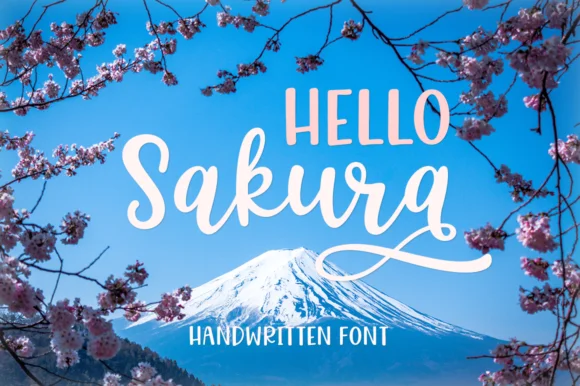
1 / 7About Hello Sakura Font
There's a quietness to this typeface, a kind of delicate sophistication that feels both personal and refined. Hello Sakura, designed by Pasha Larin, is a light handwritten serif that brings genuine warmth to elegant projects without artificial fussiness.
You'll find this working beautifully for wedding invitation suites, particularly when you want something more refined than standard calligraphy templates. Luxury greeting cards, boutique beauty packaging, and high-end stationery systems all respond well to its distinctive character. The handwritten quality reads as authentic and human-made while the serif structure keeps everything grounded and intentional rather than overly loose or chaotic. Consider it for journal covers, fancy food labels, portfolio pieces, small-batch packaging, or any design where lightness and polish need to coexist gracefully. The letterforms strike that balance between effortless and carefully considered, which is harder to nail than it sounds.
Use it for headlines and accents, or even moderate body text at larger sizes when you want personality without sacrificing refinement. Pair it with a clean, minimal sans-serif to provide good contrast and let the handwritten serif take the visual lead. Get Hello Sakura on Creative Fabrica and bring that quiet elegance to every new project.
Style & Use Cases
- Overall Style
- Classic, Refined, Hello Sakura
- Use Case
- Editorial, Print
- Ideal For
- book covers, long-form text, and traditional branding
- Pairs With
- a clean sans-serif for captions
How to Install Hello Sakura Font Font
Step-by-step instructions for every platform
- 1Download the Hello Sakura Font font file (.ttf or .otf).
- 2Locate the downloaded file in your Downloads folder.
- 3Right-click the font file.
- 4Select "Install" to install for the current user, or "Install for all users" to make it available system-wide.
- 5Hello Sakura Font is now available in Word, Photoshop, Illustrator, and all other apps.
More by Pasha Larin
View all →
Browse fonts by theme
Curated collections →Saw a font in a picture? Identify any font from an image with our free Font Finder.
More Serif Fonts
Browse all →
What pairs well with Hello Sakura Font?
Hello Sakura Font is a versatile serif font that works for both headings and body text. Pair it with a contrasting sans-serif or slab serif font to add visual interest and a clear distinction between titles and body copy.




Hello Sakura Font
by Pasha Larin
Reviewed by the FontBoxDL team · Updated June 2026