 Firefox
 1 / 4
1 / 4About Happy Rose Font
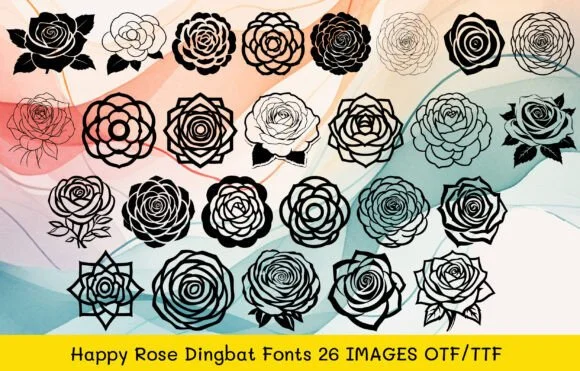
Rose motifs and playful florals give this collection an enchanting, handmade quality that feels both nostalgic and contemporary. Happy Rose, designed by MOMAT THIRTYONE, is a dingbat font with 26 individual floral and star characters that replace letters A through Z. This set works brilliantly for creating wedding invitation suites where organic florals set a sophisticated mood, personalized greeting card designs with decorative flourishes that save design time, scrapbook page embellishments that feel genuinely handcrafted, or DIY vinyl decal and hand-lettered sign projects where each letter becomes a visual element. No illustration experience required; simply type and let the botanical characters do the heavy lifting. Both OTF and TTF file formats ship with the font, ensuring broad compatibility across your design software, cutting platforms, and embroidery applications.
Pairing Happy Rose with a clean serif or restrained sans-serif typeface for supporting body text creates balanced layouts where the floral characters shine as the true focal point of the page. Its character translates beautifully across printed wedding invitations, digital social media graphics, hand-decorated craft projects, embroidered designs, and custom product packaging labels. Find Happy Rose on Creative Fabrica and bring rose-inspired botanical detail and charm to your next creative project.
Style & Use Cases
- Overall Style
- Iconographic, Rose Dingbats
- Use Case
- Icons, Accents
- Ideal For
- ornaments, bullets, and decorative flourishes
- Pairs With
- any text font
How to Install Happy Rose Font
Step-by-step instructions for every platform
- 1Download the Happy Rose font file (.ttf or .otf).
- 2Locate the downloaded file in your Downloads folder.
- 3Right-click the font file.
- 4Select "Install" to install for the current user, or "Install for all users" to make it available system-wide.
- 5Happy Rose is now available in Word, Photoshop, Illustrator, and all other apps.
More by MOMAT THIRTYONE
View all →



Browse fonts by theme
Curated collections →Saw a font in a picture? Identify any font from an image with our free Font Finder.
More Dingbats Fonts
Browse all →







What pairs well with Happy Rose Font?
Happy Rose Font is a versatile dingbats font that works for both headings and body text. Pair it with a contrasting sans-serif or serif font to add visual interest and a clear distinction between titles and body copy.




Happy Rose Font
Reviewed by the FontBoxDL team · Updated July 2026