 Firefox
 1 / 6
1 / 6About Happy Rose Font
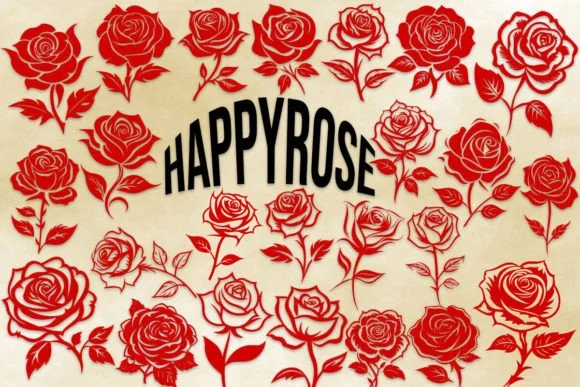
Picture a wedding stationer sketching out invitation suites, looking for decorative elements that feel fresh but not overdone. That's where Happy Rose by MOMAT THIRTYONE comes in: a dingbats collection built entirely around rose and floral motifs that function as actual design components rather than decorative filler. The font gives you 62 characters total (26 uppercase, 26 lowercase, plus numbers 0-9), and each one is crafted to hold its own weight in a layout.
You'll find this set working hardest on wedding invitation suites and greeting cards where you need repeatable floral elements, but it's equally useful for personalized gift tags, boutique skincare packaging, and DIY event signage. The roses feel illustrated enough to carry visual interest without slipping into clip-art territory, which matters when you're trying to keep layouts clean and intentional. They hold their detail at display sizes and still read clearly when dropped smaller, making them genuinely flexible across different formats and applications. This kind of versatility is what separates a toolkit you'll actually use from a collection that sits unused.
Grab Happy Rose on Creative Fabrica and you'll have a solid ornamental resource for any project leaning toward nature-forward or vintage aesthetics. The collection's strength lies in how each symbol works both as standalone accent and as pattern element.
Style & Use Cases
- Overall Style
- Iconographic, Dingbats
- Use Case
- Icons, Accents
- Ideal For
- ornaments, bullets, and decorative flourishes
- Pairs With
- any text font
How to Install Happy Rose Font
Step-by-step instructions for every platform
- 1Download the Happy Rose font file (.ttf or .otf).
- 2Locate the downloaded file in your Downloads folder.
- 3Right-click the font file.
- 4Select "Install" to install for the current user, or "Install for all users" to make it available system-wide.
- 5Happy Rose is now available in Word, Photoshop, Illustrator, and all other apps.
More by MOMAT THIRTYONE
View all →



Browse fonts by theme
Curated collections →Saw a font in a picture? Identify any font from an image with our free Font Finder.
More Dingbats Fonts
Browse all →







What pairs well with Happy Rose Font?
Happy Rose Font is a versatile dingbats font that works for both headings and body text. Pair it with a contrasting sans-serif or serif font to add visual interest and a clear distinction between titles and body copy.




Happy Rose Font
Reviewed by the FontBoxDL team · Updated July 2026