 Firefox
 1 / 4
1 / 4About Happy Flower Font
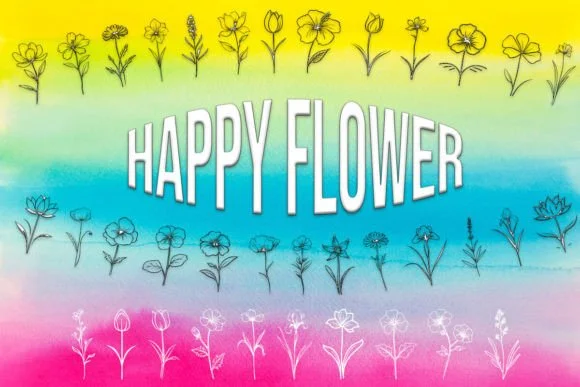
These delicate botanical symbols capture the joy of springtime through hand-drawn floral elements that feel both playful and refined. Happy Flower, designed by MOMAT THIRTYONE, is a dingbat collection that transforms simple marks into charming botanical ornaments, perfect for adding organic character and visual warmth to any creative project.
The real value of this font shows up in specialized applications where florals function as genuine design elements rather than mere decoration. Reach for it when building wedding invitation suites with layered botanical borders and accents that guide the eye across the page. Create eye-catching Etsy product labels for artisanal candles, natural cosmetics, and handmade botanical products that need to signal quality at first glance. Boutique skincare packaging gains immediate warmth and elegance when paired with these illustrative elements, while DIY craft signs, hand-lettered gift tags, and personal stationery all take on an inviting charm. The consistent botanical aesthetic gives each application a cohesive, deliberately curated feel that speaks to thoughtful design work.
This collection suits designers, crafters, and makers who recognize that the right symbol can truly define an entire project's character and emotional resonance. Find Happy Flower on Creative Fabrica and begin weaving botanical richness through your next design.
Style & Use Cases
- Overall Style
- Iconographic, Flowers
- Use Case
- Icons, Accents
- Ideal For
- ornaments, bullets, and decorative flourishes
- Pairs With
- any text font
How to Install Happy Flower Font
Step-by-step instructions for every platform
- 1Download the Happy Flower font file (.ttf or .otf).
- 2Locate the downloaded file in your Downloads folder.
- 3Right-click the font file.
- 4Select "Install" to install for the current user, or "Install for all users" to make it available system-wide.
- 5Happy Flower is now available in Word, Photoshop, Illustrator, and all other apps.
More by MOMAT THIRTYONE
View all →



Browse fonts by theme
Curated collections →Saw a font in a picture? Identify any font from an image with our free Font Finder.
More Dingbats Fonts
Browse all →







What pairs well with Happy Flower Font?
Happy Flower Font is a versatile dingbats font that works for both headings and body text. Pair it with a contrasting sans-serif or serif font to add visual interest and a clear distinction between titles and body copy.




Happy Flower Font
Reviewed by the FontBoxDL team · Updated June 2026